

Overtime pay isn’t always as simple as multiplying extra hours by an employee’s usual rate. In the United States, covered, nonexempt employees generally earn at least time and one-half their regular rate for hours worked over 40 hours per week, according to the U.S. Department of Labor. Automating overtime calculations can help apply that rule consistently, but accurate results still depend on the right hours, pay rates, and overtime settings.
It’s reasonable to expect payroll software to handle the arithmetic. The challenge is accounting for employees who work at multiple rates or under different overtime rules. This article explains the basic formula, how to calculate the regular rate when pay rates vary, and what to consider when configuring overtime rules in time-tracking software. Understanding how the pieces fit together can make payroll decisions clearer and give each pay period a more reliable process.
Key Takeaways
- Separate overtime hours from regular hours using the workweek rules that apply to the employee.
- When an employee earns multiple rates, account for those rates in the regular-rate calculation before determining overtime pay.
- Configure time-tracking rules around the relevant schedule, job, or craft so recorded hours feed the right calculation.
- Follow the overtime formula from regular-rate calculation through premium pay to understand how a payroll total is reached.
How Is Overtime Calculated?
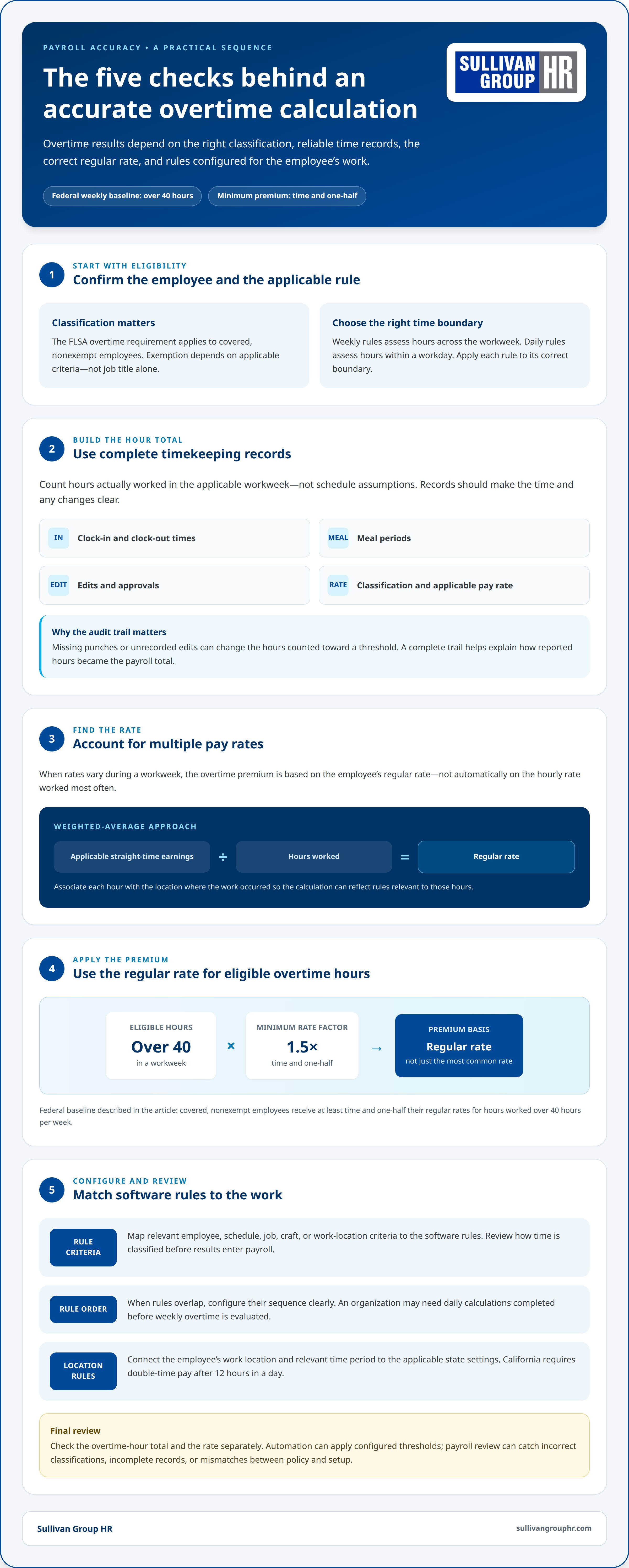
Overtime calculations depend on employee classification, recorded work hours, and the applicable threshold. For covered, nonexempt employees, the FLSA sets the federal baseline for weekly overtime and premium pay.
FLSA Weekly Overtime Thresholds
The FLSA weekly overtime threshold is the hours-worked point that triggers overtime eligibility for covered, nonexempt employees. According to the U.S. Department of Labor, under the weekly overtime option, an employee is paid overtime for hours worked over 40 hours per week. A system can identify hours above that threshold automatically, reducing manual counting and supporting consistent reporting.
Employees who qualify as exempt under the FLSA aren't covered by its overtime requirement. Exemption depends on meeting applicable criteria, not on job title alone, so classification must be established before the system evaluates hours.
Timekeeping Records for Overtime Calculations
Accurate calculations depend on timekeeping records that show when each employee worked and how those hours fall within the workweek. Records should capture clock-in and clock-out times, meal periods, edits, and approvals, as well as the employee’s classification and applicable pay rate. These details help payroll distinguish time actually worked from schedule assumptions.
Missing punches or unrecorded edits can change the hours counted toward the threshold. A complete audit trail also helps explain how reported hours became the payroll total, particularly when a manager corrects a time entry.
Overtime Premium Pay
Overtime premium pay is the additional compensation owed for eligible hours above the FLSA threshold. The U.S. Department of Labor states that covered employees who aren't exempt must receive at least time and one-half their regular rates of pay for those hours. The regular rate is the basis for calculating the premium.
Payroll needs both an accurate overtime-hour total and the correct rate. Reviewing these separately makes it easier to spot timekeeping issues and understand the gross-pay result. Automation can apply configured thresholds, while payroll review can catch incorrect classifications or incomplete records.
How Payroll Professionals Configure Overtime Rules in Time-Tracking Software
Payroll professionals translate applicable overtime policies into settings that link tracked hours to payroll calculations. Clear rules help prevent the system from applying the wrong configuration to a schedule, job, or work location.
Rules-Based Software Configuration
Rules-based configuration assigns overtime treatment to recorded time using defined employee, schedule, job, or craft criteria. Payroll professionals first identify which criteria affect the calculation, then map them to the relevant software rules. In a Costpoint environment, the same careful setup means aligning the organization’s overtime policy with its time records, rather than assuming a product handles every policy identically.
For example, a rule may separate hours by job or apply shift parameters to time-card entries. Payroll teams can review how the system classifies regular and overtime hours before the results enter payroll. This helps catch mismatches between the intended policy and the time-tracking setup.
Daily and Weekly Overtime Rules
Daily rules evaluate hours within a workday, while weekly rules assess hours across the workweek. The distinction matters when employees work long shifts, varied shift lengths, or across multiple days. Timekeeping software must apply each rule to the right time boundary, rather than treating every overtime trigger as weekly.
Payroll professionals configure the applicable threshold and determine how the system handles overlapping rules. For instance, an organization may need daily calculations completed before weekly overtime is evaluated. Clear sequencing helps classify hours consistently and reduces the need for manual adjustments to reconcile reports.
State-Specific Overtime Settings
State-specific settings reflect the overtime rules that apply to employees based on their work location. California Department of Industrial Relations states that California requires double-time pay after 12 hours in a day. Payroll professionals incorporate applicable state rules into configuration, keeping the location and relevant time period connected to each employee’s records.
California’s daily and weekly overtime requirements make rule selection especially important: a calculation may need to account for more than one trigger. A sound setup also distinguishes eligible hours and premium rates, so payroll can review the result against the rules applied. This is where professional payroll administration support can help align time tracking and payroll processing.
Multiple pay rates and regular-rate calculations
Employees may work at different rates or across locations during one workweek. Before calculating the premium, payroll must connect the hours worked and earnings to the applicable overtime rules.
Regular-Rate Calculations Across Pay Rates
The regular rate reflects an employee’s compensation and hours worked, including when pay rates vary. The overtime premium is based on this rate, not automatically on whichever hourly rate appears most often.
For a weighted-average approach, payroll combines the employee’s applicable straight-time earnings, then divides by the hours worked. The resulting average can provide the basis for the overtime calculation. The U.S. Department of Labor says covered, nonexempt employees must receive at least time and one-half their regular rates for hours worked over 40 hours per week.
When employees work at multiple locations, payroll also needs to associate each hour with the location where the work occurred. This lets the calculation apply the rules relevant to those hours rather than treating every location as if it had identical requirements.
Overtime Multipliers and Pay Types
An overtime multiplier applies a factor to the regular rate for eligible overtime hours. Time-and-a-half uses a 1.5 multiplier; double-time uses a 2.0 multiplier. The applicable pay type matters because the same number of overtime hours can produce different pay under different multipliers.
Payroll professionals map each overtime category to its configured multiplier and associate it with the relevant hours. For example, if a rule assigns double-time to a category, the system must distinguish those hours from hours paid at time-and-a-half. Clear categories make payroll reports easier to review.
With complex schedules, different rates, and multiple locations, accurate inputs are essential. Payroll professionals review rate history, hours worked, location coding, and overtime categories together. This helps ensure the regular-rate calculation and multiplier reflect the work performed and the applicable labor laws.
Basic overtime pay formula and calculation example
A basic overtime calculation separates regular hours from overtime hours, then applies the overtime rate to eligible hours. The formula is: regular hours multiplied by the hourly rate, plus overtime hours multiplied by the overtime rate. This makes each part of gross pay visible and easier to review.
Consider an employee earning $20 per hour who works 45 hours in a week. With a threshold of 40 hours per week, 40 hours are regular time and five are overtime. At time and one-half, the overtime rate is $30 per hour: $20 multiplied by 1.5. Five overtime hours at $30 produce $150 in overtime pay.
This example assumes one hourly rate and the stated threshold. When rates vary, payroll may first need to determine the employee’s regular rate before applying the overtime premium.
Automating overtime calculations applies configured rates to recorded hours, but accurate inputs still matter. A missed punch can change the hours total, while an incorrectly entered rate can alter the overtime amount. Payroll professionals review time records, applicable rates, and calculated results to trace unexpected amounts to their source. This helps reduce administrative errors and keeps calculations precise.
For a clear review, payroll can keep regular hours, overtime hours, the rate used, and the resulting amount visible as separate figures. Automating overtime calculations is most useful when the system handles those inputs consistently and payroll can identify exceptions for review. For help with payroll administration and overtime calculations, get payroll administration support.
Sullivan Group HR
Sullivan Group HR helps businesses connect timekeeping, payroll calculations, and pay administration through its HCM, Payroll Outsourcing, and Payroll Administration offerings. These services can help when payroll teams manage changing schedules, multiple pay rates, or overtime rules across employee groups. The aim is a clearer process for turning recorded hours and pay details into payroll results, supported by professional administration.
For businesses that need help coordinating these responsibilities, Sullivan Group HR offers a practical next step beyond understanding the calculations. Contact Sullivan Group HR to discuss your payroll needs.
Make Payroll Processes Easier to Manage
Decide how overtime rules, time records, and payroll review should work together in your organization. A dependable process gives payroll professionals a clear way to handle exceptions, trace unusual totals, and keep calculations aligned with current workplace practices. That clarity matters as schedules and pay arrangements change.
Automating overtime calculations can support a more consistent workflow, but oversight still matters. Clear responsibilities help teams identify incomplete time entries, resolve rate questions, and review payroll before it’s finalized. The goal isn’t simply to move faster. It’s to make the process understandable for payroll teams and the employees whose pay depends on it.
If you’re ready to make payroll administration easier to coordinate, contact Sullivan Group HR to discuss a practical next step. With the right support, your team can build a clearer process and move forward with confidence.
Frequently Asked Questions
What Is Overtime and Why Does It Matter?
Overtime is additional pay for eligible work hours that trigger an applicable overtime rule. Accurate classification and time records matter because they affect employee pay, payroll reporting, and labor costs. For example, a schedule change can push recorded hours into an overtime category even if the employee’s usual shift stays the same. Clear policies and complete records help payroll teams explain the resulting pay.
What cost savings can businesses expect with overtime management software?
Overtime management software can help control avoidable labor costs by making scheduled and recorded hours easier to review. Managers can use that visibility to spot overtime trends, address coverage gaps, and manage approvals before extra hours are worked. Any savings depend on how the business schedules staff and responds to the information. Software supports oversight, but the impact comes from decisions made using its reports.
How is overtime calculated under the U.S. Fair Labor Standards Act?
Under the federal Fair Labor Standards Act, covered employees who aren’t exempt generally receive at least time and one-half their regular rates for hours worked over 40 hours per week, according to the U.S. Department of Labor. Payroll must identify covered, nonexempt employees and use the applicable regular rate. That means classification and earnings information matter alongside the hours recorded.
How do state overtime laws differ from federal rules?
State rules can add overtime triggers or premium requirements beyond the federal baseline, so work location can affect payroll settings. For example, California requires double-time pay after 12 hours in a day, according to the California Department of Industrial Relations. A multistate employer needs location-specific rule handling so an employee’s hours are evaluated under the rules that apply where the work occurs.
How should overtime be calculated for salaried, hourly, and piece-rate employees?
Start by determining whether the employee is covered and nonexempt; salary or pay method alone doesn’t answer that question. For hourly workers, payroll uses recorded hours and the applicable regular rate. For salaried or piece-rate workers, the calculation also depends on the pay arrangement and hours worked. Keeping these details together helps payroll apply the correct method to each employee.
How are bonuses, commissions, and shift differentials included in the overtime rate?
Payroll first identifies each payment’s type and the period of work it relates to. Bonuses, commissions, and shift differentials must be handled under applicable regular-rate rules, including whether they belong in the rate used for overtime. For example, a bonus tied to work across a pay period may need to be allocated to that period before payroll finalizes the calculation.


