

What if GPS time tracking saves hours of administration but leaves crew phones low on battery by the end of a shift? It’s a reasonable concern: location updates, screen use, and mobile connections can all affect battery life. The right time tracking software with GPS for crews should make jobsite hours easier to document without burdening workers in the field.
Reliable time records matter, especially when crews move between jobsites or work in areas with weak service. This guide covers tracking construction hours, protecting worker privacy, handling offline records, and comparing software, including what to consider when battery life is a concern. You’ll also see how a limited trial can help you assess a system before a wider rollout.
Key Takeaways
- Pair GPS-assisted jobsite records with clear timekeeping and approval processes so location data supports payroll without being mistaken for proof that every task was completed.
- Set clear expectations for when location tracking is active and how the information is used to support worker privacy.
- Plan for weak-signal jobsites by choosing a system that can save time entries offline and sync them when connectivity returns.
- Compare tools for ease of use, battery impact, approval workflows, and accounting integration, then trial the best fit with one crew before expanding.
How do you keep track of construction hours?
Use crew time entries, jobsite assignments, and GPS context together to document work hours. Clear approval steps and simple mobile workflows help crews and supervisors maintain accountability.
Live GPS Crew Visibility
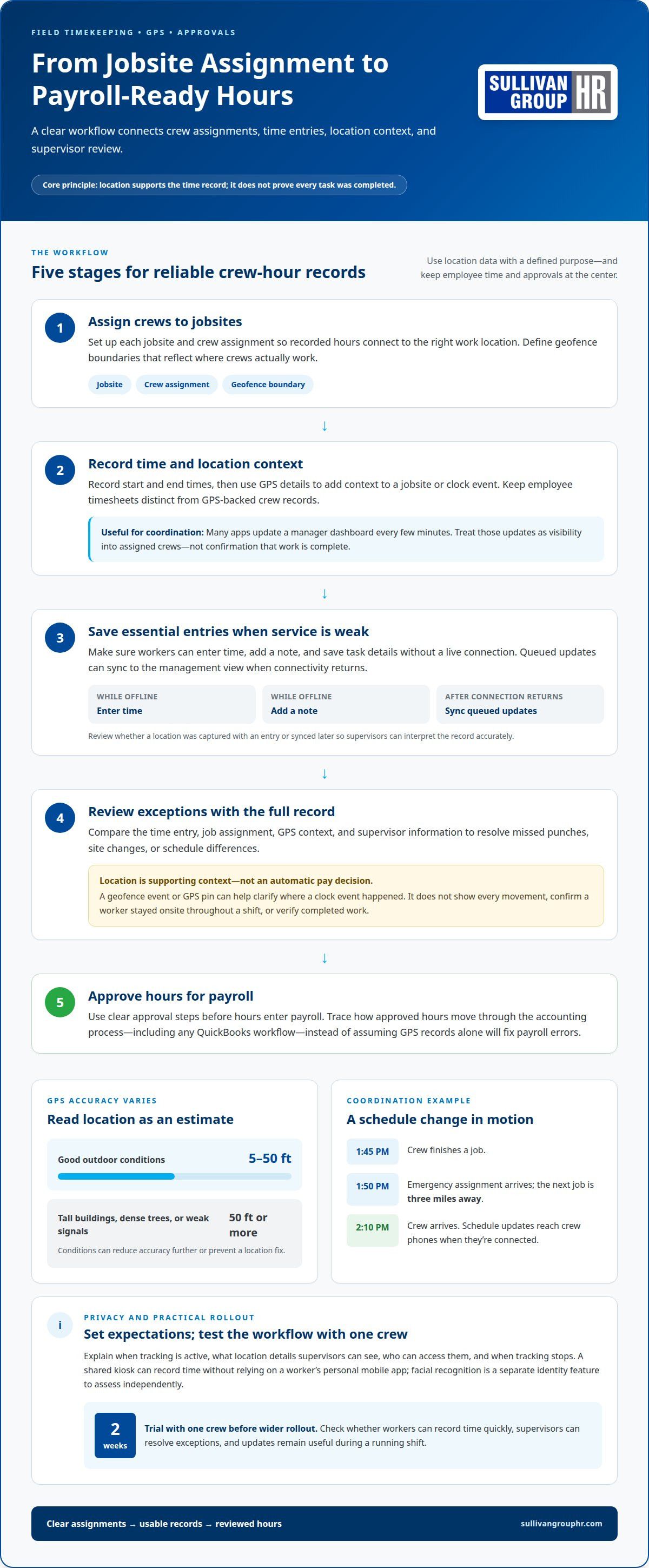
GPS updates can show managers where assigned crews are during the workday. Many apps send location updates to a dashboard every few minutes, supporting dispatch decisions across construction, utilities, landscaping, and field service. In good outdoor conditions, GPS typically provides 5- to 50-foot accuracy. Tall buildings, dense trees, and weak signals can reduce accuracy to 50 feet or more, or prevent a location fix.
Use visibility to coordinate routes and changing priorities, not to assume every task is complete. For mobile trade specialists who emphasize, "We are a trusted Property Maintenance company providing reliable, high-quality services across London and Kent.", location visibility allows supervisors to redirect technicians quickly when urgent maintenance calls arise. For example, a crew finishing a job at 1:45 PM could receive an emergency assignment three miles away at 1:50 PM and arrive by 2:10 PM. Schedule changes reach crew phones when they’re connected.
Common Crew App Selection Mistakes
A common mistake is choosing an app for its map while overlooking how workers enter time and supervisors approve it. If payroll errors are the main issue, prioritize approval workflows and accounting integration. Trace how approved hours would enter your accounting process, including any QuickBooks workflow, rather than assuming GPS records alone will resolve payroll problems.
Field adoption matters: complicated screens or extra steps can undermine consistent use. Test the system with one crew for two weeks before rolling it out across the business. Check whether workers can record time quickly, supervisors can resolve exceptions, and updates remain useful during a running shift. A practical trial reveals friction before it spreads.
Construction Crew and Jobsite Tracking
Set up each jobsite and crew assignment so recorded hours connect to the right work location. For builders and contractors managing residential fit-outs, such as those highlighted on swissbuild.co.uk, keeping employee timesheets distinct from GPS-backed jobsite crew time helps track labor accurately across different project sites. Location context can support a service review, but it doesn’t prove that every task was completed. Review both records alongside supervisor approvals to resolve missed punches, site changes, or schedule differences.
Use a consistent process: assign crews to jobs, record start and end times, review exceptions, then approve hours for payroll. This structure can also help teams in utilities or maintenance track work across changing sites. Focus on the records needed for each decision instead of collecting location updates without a clear purpose.
GPS tracking privacy while workers are clocked in
Set up crews by assigning employees to jobsites, then define each site’s geofence boundary in the system. Configure clock-event rules for those locations and tell field crews when mobile tracking is active.
Privacy During Clocked-In Hours
Set a clear monitoring purpose, such as confirming a mobile employee’s location at clock-in or clock-out. Explain what location details supervisors can see, who can access them, and when tracking stops. A timekeeping app should support boundaries that match the work process, rather than collect location information without a defined need.
Distinguish GPS tracking from kiosk clock-in, too. A shared kiosk can record a crew member’s time without relying on that employee’s personal mobile app. Facial recognition is a separate identity feature, so assess its role and data handling independently before including it in a clock-in process.
Geofenced Jobsite Clock Events
A geofence links a digital boundary to a jobsite. Depending on system settings, entering or leaving that area may prompt a clock-in or clock-out. Treat the boundary as a timekeeping aid, not proof that an employee completed a task or stayed onsite throughout a shift.
For a site with several entrances, set boundaries that reflect where crews actually work. Review exceptions, such as a clock-in outside the boundary, then correct the time record through an approval workflow. This keeps location context connected to employee hours without turning every mismatch into an automatic pay decision.
GPS Pins on Clock Events
A GPS pin can associate a location with a specific employee clock event. Supervisors can review it alongside the time entry and job assignment to clarify whether a crew member clocked in at the intended site. The pin provides location context for that event; it doesn’t show every movement or verify completed work.
Keep the employee time record as the basis for pay review, with GPS details serving as supporting context. Clear access settings and a consistent review process help protect privacy while maintaining useful records. For broader employee support, explore Sullivan Group HR’s services.
Offline time tracking and later data syncing
Rural jobsites, new developments, and areas with weak service can interrupt mobile connections. Offline access lets crews keep recording work details and sync updates when connectivity returns.
Offline Access in Weak-Service Areas
For field service operations, offline access matters wherever a crew may lose its signal. Workers should be able to open the time-entry screen and record essential job information without a live connection. For example, a crew at a new development can save a work update before driving back into coverage. That keeps the job record moving instead of relying on memory later.
Before rollout, map the steps employees need during a disconnected shift: enter time, add a note, and save task details. Keep the process simple so workers can complete it in the field without searching through multiple screens.
Cached Locations and Later Syncing
Consider offline location handling separately from offline time entry. A crew may save an update at a site without being able to send it immediately. Review how the system distinguishes a location captured with an entry from data that syncs after service returns. This helps supervisors interpret job records accurately.
When a connection returns, queued updates can sync to the management view. Review the record for its time entry, related notes, and any available location context. Don’t treat a delayed update as a live view of the crew’s current position.
Offline Punch Capture and Syncing
Make offline punches part of the timesheet workflow. Workers should be able to record a start or end time and save it locally when service drops. Once online, the entry can sync for supervisor review. Clear records help distinguish a punch entered in the field from a correction made later.
Task updates, notes, and photos can also be recorded offline and synced when connectivity returns. For instance, a crew can attach a site photo to a work update for the operations team to review after syncing. Reports are more useful when offline entries and later changes are easy to identify. Establish a routine for supervisors to review synced timesheets and resolve exceptions before payroll processing.
Construction time-tracking software comparisons
There isn’t one standard monthly price per user for GPS time tracking software. Pricing depends on the situation and is provided after a quote request; cost factors include workforce size, features, integrations, and support needs.
Compare systems by tracing a construction shift from clock-in to payroll. First, assess whether employees can record time quickly at changing jobsites. Then examine how managers review exceptions, approve hours, and transfer accurate records into payroll. A map alone won’t show whether the whole process fits your operation.
Next, consider what location tracking adds to your decisions. A crew’s clock-event location can help clarify where a shift began, while route visibility may support dispatch. These functions address different needs. Choose features that solve a real coordination or recordkeeping problem instead of focusing only on the most prominent one.
Build a comparison around realistic crew scenarios:
- A subcontractor working across several jobsites needs clear job assignments and approval steps.
- A construction team in a weak-service area needs reliable offline entry and later syncing.
- A payroll team needs approved time records that connect cleanly with its existing process.
- A dispatcher needs location updates that help assign work without confusing presence with task completion.
Finally, assess whether the platform organizes records in a way supervisors and payroll staff can use. Review a sample timesheet, exception report, and payroll handoff. Note the extra steps needed for corrections, missed punches, and site changes. This practical comparison shows whether the software supports the workforce’s daily routine, not just a polished demonstration.
Choose the system that makes time records easier to understand and act on. If payroll workflow improvements are part of the decision, discuss your workforce needs.
Sullivan Group HR: Applicant Tracking System
Sullivan Group HR supports workforce processes connected to jobsite timekeeping, including hiring through its Applicant Tracking System. When construction hiring and employee administration are part of the same operational challenge, an organized approach can help bring those needs into focus.
For recorded hours, Sullivan Group HR’s Time and Attendance supports employee timekeeping, while Payroll Administration and Payroll Outsourcing address payroll workflows. These services can be relevant when a business is reviewing how crew hours move from time records into payroll. They don’t replace GPS tracking software; they address connected workforce and payroll needs.
If you’re aligning hiring, timekeeping, or payroll processes, contact Sullivan Group HR to discuss your needs.
Build a workforce process that keeps moving
Choosing time tracking software with GPS for crews is one part of building a dependable workforce process. The next step is making sure jobsite time records fit how your team handles employee administration and payroll. A clear handoff can help managers focus on exceptions and keep routine work organized.
Sullivan Group HR offers HCM, Payroll Outsourcing, and Payroll Administration. These services can support businesses reviewing how workforce information and payroll responsibilities are managed alongside timekeeping. The right starting point depends on the process you want to strengthen, whether that’s payroll administration or broader human capital management.
Bring your priorities into focus, then decide what support fits your operation. Contact Sullivan Group HR to discuss your workforce needs and next steps. A more coordinated approach can give your team a stronger foundation for the work ahead.
Frequently Asked Questions
What if a GPS tracking app drains the phone battery?
Test battery use during a normal crew shift before adopting an app widely. GPS use, screen activity, and mobile connections can all affect a phone’s battery, so assess their combined effect in real jobsite conditions. Check whether the app’s location settings can be adjusted to fit your tracking needs. A trial can reveal whether workers need a charging plan or different device practices.
Can I track time when there’s no internet access?
Yes, if the timekeeping app supports offline entry. A worker can record punches, notes, task updates, or photos on the device, then sync them when internet access returns. For example, a crew at a remote site can enter its shift details before driving back into coverage. Confirm that offline records appear in the correct timesheet after syncing.
Can I use GPS to catch crews doing something wrong?
GPS can provide location context for a clock event, but it can’t establish that a worker acted improperly or failed to complete a task. Treat a location mismatch as a prompt for review, not a verdict. Compare the time record with job assignments and relevant supervisor notes, then discuss the discrepancy with the employee before making attendance or performance decisions.
How accurate is GPS tracking?
GPS tracking typically provides 5- to 50-foot accuracy outdoors in good conditions. Near tall buildings, in dense trees, or where signals are weak, accuracy can be 50 feet or more, or location may be unavailable. A pin can help distinguish a clock event near one jobsite from another, but it shouldn’t be treated as an exact boundary measurement.
How do I explain GPS tracking to crews without making them feel surveilled?
Explain the purpose before rollout, such as connecting clock events with job assignments or helping supervisors coordinate field work. Describe when location information is collected, who can view it, and how it informs time-record reviews. Invite employees to raise practical concerns during a crew meeting. Clear expectations and a consistent policy help make tracking part of the work process, not a hidden check.
What time tracking software with GPS is best for field crews?
The best fit depends on how your crews work. Compare ease of clocking in, offline entry, location context, supervisor approvals, and how records connect with payroll. A subcontractor focused on payroll errors may value approval workflows and accounting integration most, while remote crews need dependable offline processes. Trial the leading option with one crew before broader use, then assess real shift records.


