

Project-based time tracking solutions record how much time a team spends on specific projects and tasks, rather than only the total hours worked. Team members log time against the work they do, then review and edit entries so project records stay useful for planning and reporting.
Tracking project hours can feel like one more task in an already full day. A clear process helps you see where time goes, spot work taking longer than expected, and understand how projects use team capacity.
This guide explains how project time tracking works, how to log and edit hours, and what to compare when choosing software for your company. It also covers how tracking by project, phase, or task changes the picture, so you can choose an approach that gives your team useful detail without making time entry unnecessarily complicated.
Key Takeaways
- Review and correct time entries after they’re logged so project records remain useful for planning and reporting.
- Separate billable from non-billable work to make project hours clearer for clients, managers, and finance teams.
- Choose software by how well it fits your team’s workflow, reporting needs, and approach to tracking time.
- Pick the right level of detail, from whole projects to phases and tasks, to see where team effort goes.
Can you edit times in project time tracking after the fact?
Yes. You can correct project time entries after submission when system permissions allow it. Record the change clearly by identifying the affected task, correcting the duration, and adding a reason if your review process requires one. A manager can then approve the adjustment, keeping the record accurate and useful for future decisions.
Time data helps managers compare progress with estimates and spot workload pressure. For example, a project estimated at one hundred hours may need attention when the team has logged sixty hours but completed only 40% of the work. Reviewing hours against budgets weekly can reveal that mismatch early. Managers can then reassign tasks or adjust plans. Developers gain a clearer record of time spent on tasks, while clients and finance teams can use project records to understand reported hours and costs.
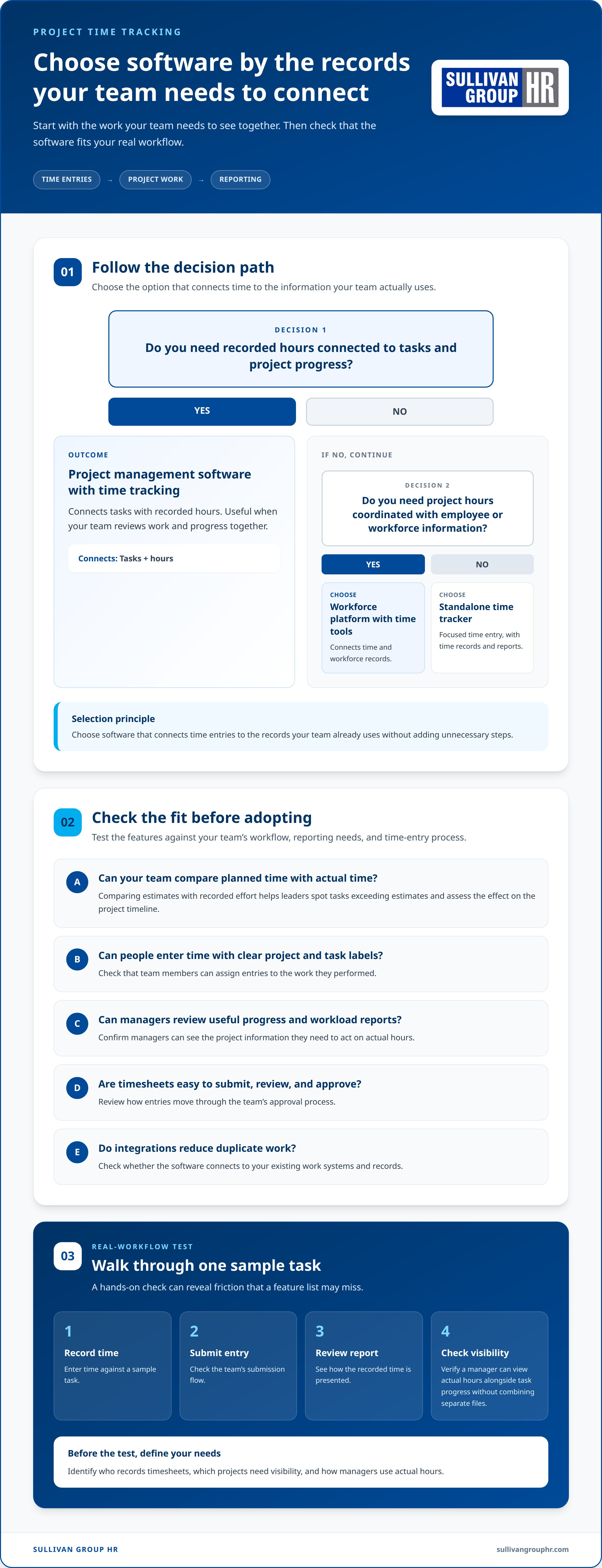
Integrations connect time entries with project management records, reducing duplicate entry and helping teams view hours alongside tasks. Compare software based on how its features connect work assignments, time records, and reporting.
| Option | Integration | Useful for |
|---|---|---|
| Standalone time tracker | Time records and reports | Teams needing focused time entry |
| Project management software with time tracking | Tasks and recorded hours | Teams reviewing work and progress together |
| Workforce platform with time tools | Time and workforce records | Organizations coordinating project and employee information |
Choose software that connects time entries to the records your team already uses without adding unnecessary steps.
To manage capacity, compare logged hours with assignments before adding work. For example, an employee committed to seventy hours of project work over the next two weeks should not receive another project during that period. To assess costs, compare actual time with the original quote: if a project takes twenty hours instead of fifteen, the extra effort must be absorbed or discussed with the client.
Employee time tracking can expose sensitive work patterns and create risks if access is excessive, account security is weak, or monitoring practices are unclear. Limit access to people who need the records, protect accounts, and explain how time data supports transparency and productivity.
How do you keep track of project hours with project time tracking?
Set a clear billing rule for each project. Mark work as billable when clients are charged for it, and non-billable when it supports delivery but isn’t invoiced. For example, a client meeting may be billable under one agreement, while internal planning remains non-billable. Define these categories before work begins so team members classify effort consistently.
For hourly billing, calculate charges by multiplying approved billable hours by the agreed hourly rate. Keep non-billable entries separate: they show how the team uses its time but don’t belong on a client invoice. Detailed records can also reveal whether revisions, research, or project coordination are taking more effort than planned, helping managers review productivity and workload.
Use a straightforward workflow: assign each time entry to a client, project, and task; select its billable status; then submit it for review. Before invoicing, compare approved hours with the client agreement and remove internal or other non-billable work. For example, if a designer records client revisions and internal handoffs separately, the invoice can show chargeable work while still accounting for coordination time.
Align billing reviews with your invoice schedule. A project manager can approve entries before finance prepares an invoice, and finance can follow up on missing descriptions or unclear classifications. For fixed-fee work, time records still help compare actual effort with the plan, even when hours don’t determine the client’s charge. Discuss billable and non-billable work with clients in advance to set expectations and avoid surprises.
When hiring changes affect project capacity, explore workforce support as part of planning your team’s next steps.
Choosing time tracking software that fits company needs
Effective tracking software should suit your team’s workflow and reporting needs. Start by identifying who records timesheets, which projects need visibility, and how managers use actual hours.
Planned and Actual Project Time
Comparing planned time with actual time shows whether tasks are staying within their estimates. For example, a design team can compare the hours allocated for a draft with the time recorded after revisions. This helps team leaders spot tasks exceeding estimates and assess the impact on the project timeline. Unlike a basic timesheet, this comparison links recorded effort to project plans.
Comparing Project Time Tracking Tools
Project time tracking tools vary in the work they bring together. A standalone tracker focuses on time entries, while project management software may connect records with tasks and deadlines. A broader workforce platform can make project hours part of wider employee workflows. Compare the features your team will use, such as approvals, reports, and connections to existing work systems.
Test the software with a real workflow before adopting it. Have a team member record time against a sample task, submit the entry, and review the report. Then check whether a manager can view actual hours alongside task progress without exporting and combining separate files. This walkthrough can reveal friction that a feature list may miss.
- Confirm team members can enter time with clear project and task labels.
- Review whether managers can see project progress and workload in useful reports.
- Check how timesheets move through submission, review, and approval.
- Assess whether integrations reduce duplicate work in your current systems.
Choose software that presents useful records clearly to the people who act on them. If finance needs project summaries while team leads need task-level visibility, find a workflow that supports both without adding unnecessary steps.
Project-, phase-, and task-level time tracking
Choose a tracking level that supports the decisions your reports need to inform. Project totals show overall effort, while phases and tasks reveal how that effort is distributed.
Project-Level Time Tracking
Project-level tracking records employees’ time against an entire project without separating individual activities. It gives managers a simple view of total effort and helps them compare progress with project estimates. Regular time tracking, by contrast, may record only the hours worked each day. An employee could log eight hours without showing how much time went to a particular client project.
Task-Level Time Tracking
Task-level tracking links each time entry to a specific piece of work, such as drafting a proposal or testing software. Employees can include those details on timesheets, giving managers more context than a project total alone. This level can help identify tasks requiring more effort than estimated, but employees need to categorize their work carefully.
Phase-level tracking sits between project and task tracking. A team might record time against research, production, and review phases within one project. Managers can compare effort across stages without examining every task. This approach is useful when progress depends on distinct stages, but individual task detail isn’t needed for every decision.
Reports are more useful when the tracking level matches the question. Use project totals to understand overall effort, phases to compare stages, and tasks to examine specific work. For billable projects, task labels can also connect recorded time with client work. When time entries integrate with project management, employees may avoid entering the same project details in separate systems.
Set a consistent rule for employees: choose the project first, then the phase or task when needed. This keeps timesheets consistent and helps reports compare like with like. Discuss workforce process support as you plan how employee records fit your organization’s workflows.
Sullivan Group HR: Applicant Tracking System
Sullivan Group HR offers applicant tracking, screening, and onboarding tools to help businesses organize hiring as team needs change. If project workloads indicate a need for additional employees, recruiting support can complement your time and capacity planning.
For broader workforce administration, Sullivan Group HR offers Time and Attendance, HCM, and Payroll Outsourcing. These services support employee time records, human capital management, and payroll needs. They complement project planning by helping businesses manage related workforce processes, but they don’t replace project-level time tracking software.
Consider these services when hiring or workforce administration becomes part of your project capacity planning. Contact Sullivan Group HR to discuss your organization’s needs.
Turn project insight into your next step
Use time data as a starting point for better workforce decisions, not as an administrative endpoint. As project plans change, consistent records can inform how your organization assigns responsibilities, supports employees, and aligns operational processes. The next improvement may be a clearer staffing or payroll workflow, rather than another layer of project reporting. Choose the step that addresses your team’s most pressing need.
Project-based time tracking solutions can make project effort easier to interpret alongside broader workforce needs. Sullivan Group HR offers HCM, Payroll Outsourcing, and Payroll Administration to help organizations manage related human capital and payroll processes. These services complement workforce planning but don’t replace project time tracking.
If you’re ready to connect project visibility with workforce operations, talk with Sullivan Group HR. Build on what your records reveal and move forward with a plan your team can use.
Frequently Asked Questions
What is time tracking?
Time tracking means recording how long work takes. An entry may include the date, duration, and activity, such as preparing a report or attending a client meeting. Employees and managers can use these records to understand how workdays are spent. The right level of detail depends on the purpose: payroll records and project analysis may need different information.
What is the difference between time tracking and project time tracking?
Regular time tracking records working hours, while project time tracking links hours to specific work. For example, an employee may log an eight-hour workday without showing how much time went to a client assignment, internal planning, or training. Adding project context helps teams distinguish those activities and see how the recorded hours were used.
Where Did All the Hours Go?
Review completed work alongside calendars, messages, and meeting records. Look for recurring activities missing from project entries, such as client emails, handoffs, or coordination. Then compare planned tasks with recorded work to identify gaps and repeated interruptions. Use what you find to improve task descriptions and time-entry habits, rather than treating missing detail as evidence of low productivity.
What are the best project-based time tracking solutions in 2026?
The right fit depends on the decisions your team needs time records to support. A team focused on client billing, for example, may prioritize clear project attribution, while managers overseeing delivery may value reports that compare work with estimates. Before choosing, identify who will enter, review, and use the data, then assess each option against that workflow.
How do project-based time tracking tools track hours by project, task, and client?
These tools typically organize entries with labels or linked records for a client, project, and task. An employee might select a client account, choose its website redesign project, and assign time to research or testing. This structure lets reports group hours at different levels. Consistent naming is important: duplicate project labels can split records and make totals harder to understand.
Which project time tracking tools offer free plans or free trials?
Free plans and trials vary by product, so compare the terms of the tools you’re considering. Check whether an option lets your team test its actual workflow, including time entry, approvals, and the reports you need. Review limits on users, data history, or features before relying on a free tier. A useful trial should answer practical questions, not just demonstrate the interface.


