

What if employee self service payroll could reduce routine back-and-forth without leaving employees to handle every pay question alone? Employees need convenient access to payroll information and clear steps for routine requests. Employers need accurate processes that connect payroll with time tracking and benefits administration. A portal can support that work, but it is only one part of the picture.
The right approach treats self-service as an employee-facing layer within supported payroll operations, not as a stand-alone login. This guide explains what employee self-service payroll can do, where its role ends, and how to identify employee and employer needs before evaluating a solution. You’ll also learn what to consider beyond portal access, including how payroll, time tracking, and benefits administration fit together.
Technology should make routine tasks easier, not replace people when support is needed. Sullivan Group HR combines isolved HCM technology with a dedicated specialist for each client, backed by 40 years of experience in payroll, HR, and employee-benefits management. The approach brings practical tools and personal support together.
Key Takeaways
- Understand how employee self service payroll gives employees access to selected work information and tasks while payroll administration supports the broader process.
- Map how employee information, time tracking, payroll administration, and employer review fit into your everyday workflow.
- Evaluate a solution beyond its login by considering employee tasks, integration, employer workflows, and access to human support.
- Prepare for adoption by clarifying task ownership, reviewing current processes, and explaining responsibilities to employees.
- See how Sullivan Group HR combines isolved HCM technology for payroll, tax filing, time tracking, and benefits administration with a dedicated specialist.
What Is Employee Self-Service Payroll, and What Does It Mean for Employers?
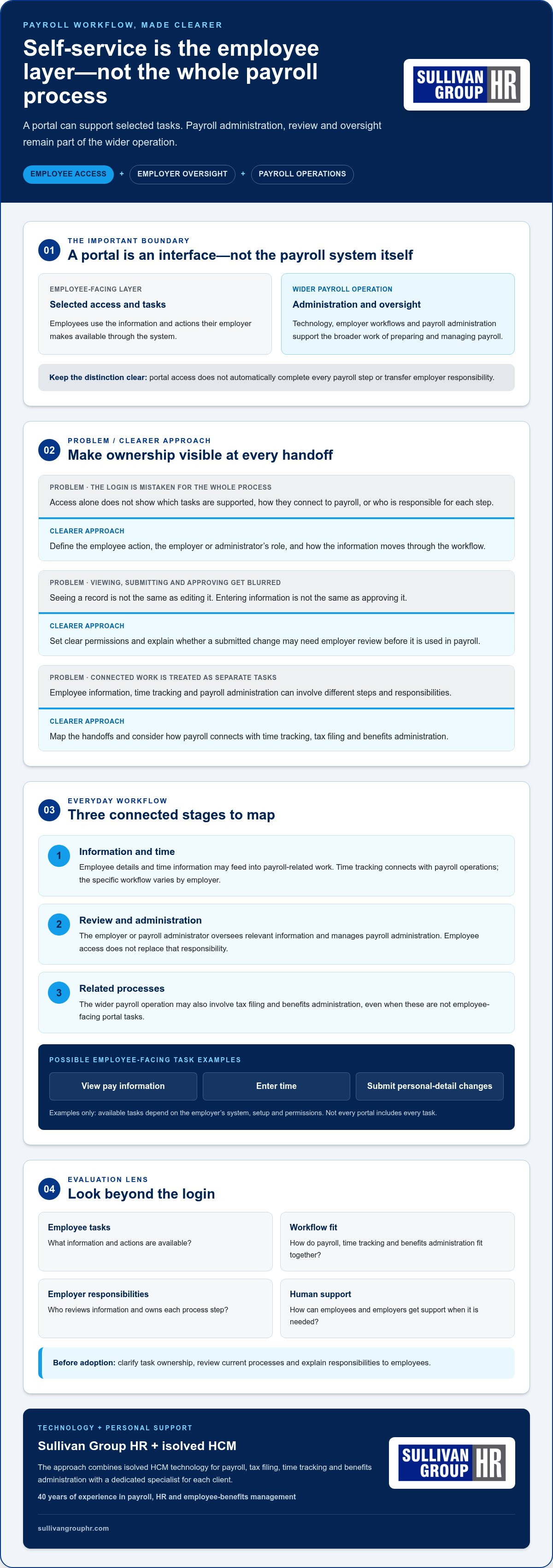
Employee self-service payroll is the employee-facing way to access selected payroll-related information and complete tasks an employer makes available. It is not the payroll system itself. The interface may let employees view information or submit a request. Behind it, payroll technology and administration support the broader work of preparing and managing payroll.
That distinction matters. A portal can make routine interactions easier, but it does not automatically complete every payroll step or transfer responsibility from the employer. Employees use the access and tasks their employer provides. Employers and their payroll teams continue to manage processes, review information, and oversee payroll operations.
What does employee self-service payroll usually refer to?
The term generally describes a digital way for employees to reach relevant work information and handle supported tasks. Depending on the employer’s system and setup, examples might include viewing pay information or submitting changes to personal details. These are general examples, not features every portal includes.
The employee-facing interface is only one part of the arrangement. Payroll processing and tax administration happen through the wider payroll operation, which may involve technology, employer workflows, and payroll administration support. A portal can connect employees to certain steps without replacing the systems and oversight behind them.
Who uses payroll self-service, and why?
Employees may use self-service to access routine work information or complete an available task. Employers can use it to organize payroll-related interactions and clarify how information or requests move through their processes.
Some employees may be looking for a login. Access depends on the employer’s chosen system and setup. For employers evaluating a solution, the more useful questions are: What does the portal support? How does it fit into payroll operations? Who remains responsible for each step?
Start by separating employee actions from employer oversight. For example, an employee might provide information through an approved process, while an employer or payroll administrator reviews and uses that information in payroll. The exact division depends on the organization’s workflows. Writing down who handles each step helps prevent portal access from being mistaken for a complete process.
- Employee access: The information and tasks the employer makes available through the employee-facing interface.
- Payroll administration: The processes used to manage payroll, including appropriate review and oversight.
- System setup: The configuration that determines which tasks are supported and how they fit into the employer’s workflow.
For employers, this is the starting point for assessing employee self service payroll. Define the employee need first, then consider how the available tools fit the payroll operation. A login alone does not show whether a solution supports your workflows or makes responsibilities clear. Next, map how self-service fits into everyday payroll work.
How Employee Self-Service Payroll Fits into Everyday Payroll Work
Employee access is one point in a larger sequence. Payroll operations may begin with employee information and time records, continue through employer review and payroll administration, and include related work such as tax filing and benefits administration. A self-service tool can support selected employee-facing steps, but it does not define or complete the whole process by itself.
The handoffs matter. Information an employee submits or views may be part of a broader workflow, while employers or payroll administrators remain responsible for their review and administration roles. The sequence depends on the employer’s setup, so map responsibilities rather than assuming a portal handles each step automatically.
Which payroll-related tasks may appear in a self-service experience?
Some systems may let employees view pay information, enter time, or submit personal-detail changes. These are examples of task categories, not a promise that every system offers them. Employers determine what their system supports and which permissions apply.
Viewing and changing information are different actions. An employee might be able to see a record without editing it, and a submitted change may require employer review. Likewise, entering information is not the same as approving it. Clear permissions help employees understand what they can do and where employer oversight begins.
How does employee access connect with payroll administration?
Think of the workflow as connected stages, with ownership defined at each handoff:
- Information and time: Employee details and time information may feed into payroll-related work. Time tracking connects with payroll operations, although the specific workflow varies by employer.
- Review and administration: The employer or payroll administrator oversees relevant information and manages payroll administration. Employee access does not replace that responsibility.
- Related processes: Payroll operations may also involve tax filing and benefits administration. These activities are part of the wider workforce-management picture, even when they are not employee-facing tasks.
Self-service connects employees to selected payroll steps; employer administration keeps the wider process organized and overseen.
Sullivan Group HR provides payroll administration through isolved HCM technology, with capabilities for payroll processing, tax filing, time tracking, and benefits administration. These are broader platform and administration capabilities, not a promise that every activity is an employee self-service feature. Keeping that distinction clear helps employers assess where employee access fits and what remains part of administration.
For a closer look at how payroll responsibilities can be organized, explore this payroll administration outsourcing guide. Employers considering connected payroll administration can also learn about Sullivan Group HR’s payroll support.
How to Evaluate Employee Self-Service Payroll Beyond the Login
A login page shows where employees enter a system. It does not show whether the system fits your payroll work. To evaluate employee self service payroll, consider how employee access relates to the tools and people responsible for payroll administration. Compare practical fit across these areas:
| Evaluation area | What to consider | Why it matters |
|---|---|---|
| Integration | How does employee access relate to payroll and other HR functions? | A connected approach helps you assess the employee experience alongside broader workforce processes, rather than treating the portal as a separate destination. |
| Employee tasks | Which tasks do employees need to complete, or what information do they need to access? | Choosing around real needs helps avoid assuming every portal offers the same functions. |
| Employer workflows | How do employee actions fit with review, approvals, and payroll administration responsibilities? | Clear ownership helps prevent confusion about who handles each step. |
| Human support | Can employees understand how to use the experience and where to turn with questions? | Digital access is more useful when people know how to get help if a task or process is unclear. |
Should employers consider a portal alone or integrated HCM technology?
A narrow portal may focus on employee access to selected information or tasks. Broader HCM technology gives employers a way to consider that access alongside payroll and related HR functions. Treat integration as an evaluation framework, not an assumption about a particular system’s technical design. Ask how the different parts support your organization’s processes and responsibilities. For a wider perspective on connected workforce management, explore this human capital management strategic guide.
What should employers consider about support and usability?
A digital tool does not have to feel impersonal. Consider whether employees can follow the experience, understand what they are expected to do, and identify where to get help. Review usability from the employee’s point of view: Are instructions clear? Are responsibilities easy to distinguish? Can someone tell the difference between submitting information and having it reviewed?
Also assess how self-service fits existing payroll and HR responsibilities. Digital tools can support routine access, while personal support can help people work through questions that do not fit neatly into a portal. These approaches complement each other. A practical evaluation considers both, rather than expecting technology to replace communication or employer oversight.
Use your current workflows as the reference point when comparing options. Note which employee tasks matter, where employer review is needed, how payroll-related functions connect, and how employees get assistance. This gives you a clearer basis for weighing a portal against broader HCM support. Sullivan Group HR brings payroll administration together with isolved HCM technology and a dedicated specialist for each client. Learn about Sullivan Group HR’s payroll support as you consider what a supported approach can look like.
How to Prepare Your Business for Employee Self-Service Payroll
A smooth introduction starts with your processes, not the portal. Before choosing or configuring employee self service payroll, identify what employees need, who owns each step, and how payroll, time tracking, and benefits administration fit together. A clear plan helps employees understand what access is for and where responsibility remains with the employer.
Map employee and employer responsibilities first
Begin with recurring questions and tasks. Do employees often need payroll-related information, or do they submit updates that require review? Note where time and attendance information enters the process, who administers payroll, and who answers employee questions. This inventory gives you a grounded view of current needs instead of assumptions about what a digital tool should handle.
Use that map to prepare in a practical sequence:
- List current tasks: Capture common employee inquiries and the processes behind them, including payroll, time tracking, and benefits.
- Assign ownership: Identify who handles payroll administration, reviews relevant information, manages time-related processes, and supports employees.
- Set access expectations: Explain which activities employees can complete, what may need employer review, and where to bring questions or request assistance.
- Review connected workflows: Consider payroll, time tracking, and benefits processes together before introducing digital access. Identify handoffs or unclear responsibilities that need attention.
Connect self-service with wider workforce management
Payroll access does not sit apart from the rest of workforce management. Time and attendance processes may relate to payroll administration, while benefits administration is another part of the broader employee experience. Reviewing these areas together helps you see where employee communication and support belong in the workflow. A workforce management solutions guide can provide a wider framework for considering how technology and people work together.
Communication is part of readiness, not a final announcement after decisions are made. Tell employees what the system is intended to support, what remains an employer responsibility, and how to get help if a task or instruction is unclear. Keep the message direct. Employees should know what they are expected to do without having to interpret the boundaries on their own.
After employees begin using the access provided, review the workflow. Notice which questions continue to come up, where instructions need clarification, and whether responsibilities are understood as intended. Use those observations to refine communication and processes, without assuming every issue can or should be solved through automation.
Preparing your people and processes alongside payroll technology makes the transition more considered. Explore Sullivan Group HR payroll support for an approach that brings payroll administration and workforce technology together with personal support.
How Sullivan Group HR Connects Payroll Technology with Personal Support
Choosing employee self service payroll means considering more than what employees can access. Employers also need payroll technology and administration that fit into wider workforce management, with a clear path to personal support. Sullivan Group HR brings these needs together through isolved HCM technology and a dedicated Sullivan Group HR specialist for each client.
What does Sullivan Group HR bring to payroll self-service discussions?
Sullivan Group HR is an isolved Network Partner using enterprise-grade HCM technology. Its platform capabilities include payroll processing, tax filing, time tracking, and benefits administration. These functions support the broader payroll and workforce-management picture. They should not be read as a promise that each function is an employee portal task; employee access depends on the system and its configuration.
For employers, this distinction keeps evaluation grounded. Consider the technology in relation to the payroll and workforce processes you need to manage, while defining employee access separately. This allows a discussion about self-service to account for both the platform’s stated capabilities and the roles employees and employers need to carry out.
How does personal support complement HCM technology?
Technology provides a framework for payroll and related processes. A dedicated Sullivan Group HR specialist for each client adds a personal connection to the service model. This complements the technology, giving employers a human point of support alongside HCM technology rather than positioning digital tools as a replacement for people.
This balance matters because workforce management involves connected responsibilities, not just employee access. Employers may be considering payroll administration, tax filing, time tracking, and benefits administration together. With 40 years of experience in payroll, HR, and employee-benefits management, Sullivan Group HR brings relevant experience to those conversations.
When evaluating support, consider the needs you identified earlier: which workflows matter, where employee access fits, and how your organization wants to manage payroll-related responsibilities. Sullivan Group HR’s approach brings together:
- HCM technology: isolved technology for payroll and related workforce capabilities.
- Connected processes: payroll processing, tax filing, time tracking, and benefits administration.
- Personal support: a dedicated Sullivan Group HR specialist for each client.
These elements let employers consider technology and human guidance together as part of workforce management. To explore how Sullivan Group HR can support your organization, Let Sullivan Group HR be your solution.
Make Your Next Payroll Decision with Confidence
Your next step does not have to be choosing a portal right away. Start by identifying the employee needs and business workflows you want it to support. Then consider how employee self service payroll can fit those processes while keeping responsibilities clear and support within reach.
The right approach should serve people on both sides of payroll: employees looking for a straightforward way to handle supported tasks, and employers responsible for well-managed operations. Technology can make access more convenient, while human guidance helps keep the experience connected to your organization’s needs.
Sullivan Group HR combines enterprise-grade isolved HCM technology with a dedicated specialist for each client, backed by 40 years of experience in payroll, HR, and employee-benefits management. If you’re ready to explore a supported approach to workforce management, Let Sullivan Group HR be your solution.
With clear priorities and the right support, you can take the next step toward payroll processes that work better for your employees and your business.
Frequently Asked Questions
Is employee self-service payroll the same as payroll software?
No. Payroll software supports the employer’s payroll processes, while employee self-service is the employee-facing access provided through a system. The two may be connected, but they serve different roles. An employee interface might display selected information, while payroll software supports the employer’s broader administration. When comparing options, look at both the employee experience and the work the underlying system supports.
Can employees access pay information through a self-service system?
They may be able to, depending on the employer’s system and how access is configured. An employee-facing experience could provide selected payroll information, but the available details and permissions vary. Employers should explain what information employees can see and how to get help if something appears incorrect. Access to information does not necessarily mean an employee can change it or resolve a payroll question independently.
What can employees typically manage through payroll self-service?
Available tasks vary, but an employer may enable actions such as submitting personal-detail updates or entering time. Some systems may allow employees to view information without changing it. Before enabling a task, clarify whether it requires review or approval, who handles that review, and how employees will know a request has been received. These boundaries help prevent employees from mistaking a submitted request for a completed change.
How does employee self-service payroll affect HR and payroll teams?
Employee self service payroll can give staff a direct route to supported tasks, while HR and payroll teams continue to manage administration and exceptions. Teams may need to update internal instructions, explain task ownership, and decide how questions or correction requests are handled. After launch, note the issues employees raise. Recurring questions can point to unclear instructions, a confusing process, or a need to revisit responsibilities.
What happens if an employee cannot access payroll self-service?
The employee should use the employer’s established HR or payroll support channel rather than guessing at a workaround or sharing account details. The support contact can clarify the organization’s process for access issues and explain how to handle an urgent payroll question through an appropriate alternative. Employers can prepare by telling staff where to report access problems and what information to provide, without asking them to send sensitive credentials.
How should an employer introduce employee self-service payroll?
Introduce it with clear instructions tied to the tasks employees are expected to complete. Explain what the system is for, which responsibilities remain with managers or payroll staff, and where employees can raise questions. Use examples that reflect your own processes, then invite employees to flag confusing steps. Reviewing that feedback helps you refine guidance and address practical obstacles without assuming every employee will use the system in the same way.
Does employee self-service replace payroll administration?
No. Self-service gives employees access to selected tasks or information; it does not remove the need for payroll administration. Employers and payroll administrators still oversee the broader process, including reviewing relevant information and managing payroll operations. For instance, an employee may submit a change through an available process, but the employer’s established workflow determines how that request is handled. Clear ownership keeps employee access distinct from administrative responsibility.


