
What if an all-in-one HR system still leaves your team copying employee details from one tool to another? A unified hr platform should do more than group payroll, benefits, time, and hiring in one place. Its workflows should connect in ways that reduce manual handoffs and make workforce administration easier to manage.
If employee information is repeated across separate systems, it’s reasonable to ask whether a platform is truly integrated. The right fit depends on how its capabilities match your processes, how implementation is planned, and whether knowledgeable support is available when questions come up.
This guide explains what to look for in a unified HR platform and how to compare options based on workflow connections, support, and implementation. You’ll also see how platform access can work alongside practical HR services. Sullivan Group HR provides access to the isolved HCM platform, with support for payroll administration, employee benefits management, applicant tracking, and time and attendance. Use these criteria to assess the technology and service model that can help reduce administrative friction for your business.
Key Takeaways
- Look beyond an all-in-one label and assess whether a unified hr platform supports the workflows your business actually uses.
- Map how employee information moves from hiring through onboarding, timekeeping, payroll, and benefits to identify repeated entry and handoffs.
- Compare options against your employee lifecycle, support needs, reporting priorities, and implementation plan, not just a feature list.
- Document your current data sources and process owners before choosing a system so adoption planning reflects how work gets done.
- Consider how Sullivan Group HR pairs access to isolved HCM with HR and administrative support across key workforce needs.
What Is a Unified HR Platform, and What Problem Should It Solve?
Employee information supports several parts of a business. A candidate is hired, their details become an employee record, hours are recorded, payroll is administered, and benefits are managed. When each step relies on separate tools and manual transfers, staff may enter the same information more than once. That creates extra work and makes it harder to see where a handoff has stalled or a record no longer matches.
A unified HR platform connects workforce information and related processes so employee data can support the work that follows, rather than sitting in isolated applications. The useful distinction is connected processes, not simply a collection of tools sold under one brand.
A unified hr platform should help you understand how information relates across the employee journey. It doesn’t necessarily mean every task is automated or every system updates itself. How information moves can depend on the platform’s configuration and on how people manage each process.
Which HR processes can a unified platform bring together?
Start with core employee information, then trace how it supports hiring, time and attendance, payroll administration, and benefits management. Applicant tracking can support the hiring stage, while time records and employee details inform later workforce administration. When teams can work from connected records, they may avoid re-entering the same details at each step.
Capabilities differ by platform. Map your actual workflows before assuming a tool connects every process you need. For each handoff, record what information is used, who reviews it, and what the next person needs to continue the process.
How does a connected HR system differ from disconnected tools?
With disconnected tools, a new hire’s information might be recorded in an applicant tracking system, then manually transferred into a separate employee record. Details needed for timekeeping, payroll administration, or benefits may require additional entry or handoffs. In a connected approach, related processes can use information associated with the employee record, but the precise flow depends on the system and your procedures.
That’s why “one platform” isn’t enough as a buying test. Check whether the tools support a coherent employee journey and whether people know who handles each step. For a broader view of how HR activities fit into workforce management, explore this 2026 human capital management guide.
The goal isn’t technology for its own sake. It’s a clearer, more dependable way to manage information and responsibilities across related HR work. When records and processes connect in a way that fits your business, you have a stronger basis for evaluating the platform’s practical value.
How a Unified HR Platform Connects Employee Data and Everyday Workflows
A shared employee record can serve as a reference point across related HR work. It helps teams see which information belongs to an employee and which processes may depend on it. However, having a record available in one platform doesn’t mean every tool updates automatically. Clear ownership, careful review, and well-defined handoffs still matter.
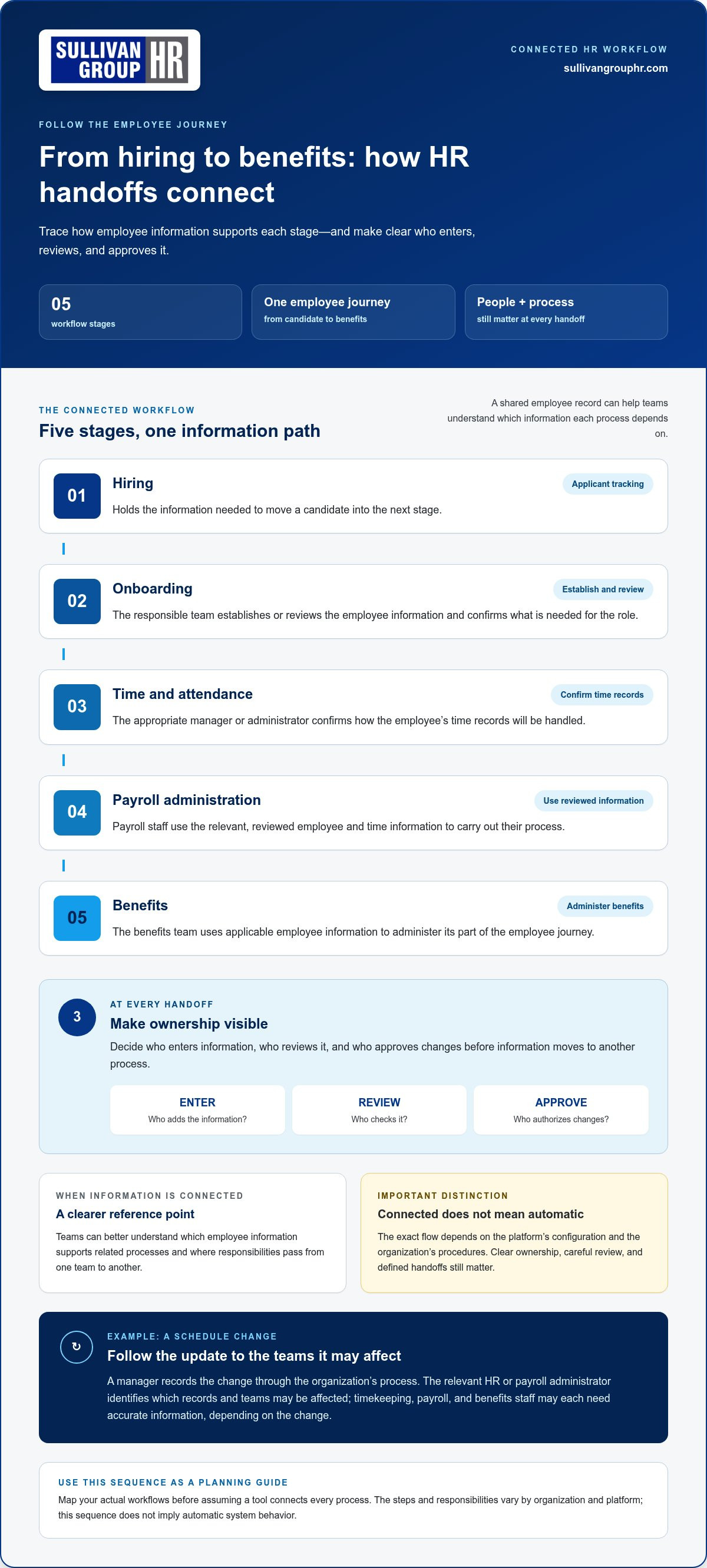
Picture a new hire, Maya. Her details begin during hiring, then the business needs to carry the relevant information into onboarding, time and attendance, payroll administration, and benefits management. A connected workflow makes those relationships easier to understand. The exact steps and responsibilities depend on the organization and platform, so use this sequence as a planning guide, not as a claim about automatic system behavior.
- Hiring: Applicant tracking holds the information needed to move a candidate into the next stage.
- Onboarding: The responsible team establishes or reviews Maya’s employee information and confirms what’s needed for her role.
- Time and attendance: The appropriate manager or administrator confirms how her time records will be handled.
- Payroll administration: Payroll staff use the relevant, reviewed employee and time information to carry out their process.
- Benefits: The benefits team uses applicable employee information to administer its part of the employee journey.
At each handoff, decide who enters information, who reviews it, and who approves changes. This ownership map helps teams identify missing details before information moves to another process. It also gives employees a clearer path for raising questions or correcting their information.
What happens when employee information is connected across HR functions?
Now imagine Maya changes her work schedule. Her manager records the change through the organization’s process, and the relevant HR or payroll administrator identifies which records and teams may be affected. The manager, timekeeping staff, payroll team, and benefits administrators may each need accurate information, depending on the change. A shared reference can clarify the handoff, but people still need to review and route updates correctly.
Where does human HR support fit alongside the platform?
Software provides tools for handling information and processes. HR consulting can help interpret policies and guide administrative decisions, while payroll administration and benefits support address their respective processes. These responsibilities complement platform access; they aren’t the same as a software feature. For a closer look at payroll support models, see this payroll administration outsourcing guide.
A unified hr platform can provide a useful structure, but sound workflows also depend on accurate information and accountable people. Sullivan Group HR pairs access to isolved HCM with HR and administrative support. Explore Sullivan Group HR’s HCM and HR support as you consider how technology and people can work together.
How to Compare Unified HR Platforms Beyond the Feature List
A long list of modules can look impressive, but breadth alone doesn’t show whether a platform fits the way your business handles HR. Compare options against actual employee processes, from hiring and timekeeping to payroll and benefits. For each process, identify what information is used, who is responsible at each step, and what support is available when something needs attention.
Which evaluation criteria reveal whether a platform is truly unified?
Use the same criteria for every option. Start with day-to-day workflows, then assess how records, reporting, implementation, and support fit together. Separate demonstrated capabilities from broad marketing descriptions: a feature name doesn’t explain how it works in your process. A unified hr platform should make relevant connections and responsibilities clear, not just group applications under one label.
Use a recent, ordinary task to make the comparison concrete. For example, trace how a new hire’s information moves into the processes your business uses. Note what each platform supports, what your team must do, and where someone reviews or approves information. This exercise can reveal gaps that a feature checklist might miss.
How should a business weigh software breadth against HR expertise?
Software can provide tools for workforce administration, but it doesn’t replace every human judgment or administrative responsibility. Consider whether your internal team can manage payroll and HR processes with platform access alone, or whether consulting, payroll administration, or benefits support would be useful alongside it. The right balance depends on your team’s capacity and the work you need covered.
For broader guidance on how outside HR expertise can fit alongside internal responsibilities, review this HR outsourcing strategic guide.
Bottom line: Compare connected workflows, accountable support, and practical fit, not module count alone. A platform with fewer functions that align with your real processes may serve your needs better than a longer feature list that leaves everyday handoffs unresolved.
A Practical Checklist for Choosing and Introducing a Unified HR Platform
A careful selection starts before the product comparison. First, make the work visible: where employee information lives, how HR processes move, and where people repeat steps or wait for a handoff. This gives your team a practical basis for choosing a unified hr platform that fits its needs, rather than chasing features that may not solve a daily problem.
- Map current workflows. Trace how hiring, onboarding, time and attendance, payroll administration, and benefits are handled today. Note the systems, people, and approvals involved in each process.
- Identify friction. Mark repeated data entry, unclear ownership, recurring delays, and reports that take extra work to prepare. Separate occasional issues from problems that affect routine operations.
- Define requirements. Divide needs into essential workflows and optional capabilities. Include the needs of different employee groups, reporting requirements, and the support your internal team needs.
- Compare fit. Use the same requirements to assess each platform. Record what is a verified capability, what is a vendor statement that needs clarification, and what remains a responsibility for your staff or a support team.
- Plan adoption. Identify who will review processes, prepare employee information, communicate changes, and help staff learn their responsibilities. Set priorities that reflect business needs and available capacity.
What should you document before comparing platforms?
Create a simple inventory before reviewing options. Capture current tools and information sources, recurring manual steps, employee groups, and process owners. Then note your highest-priority requirements across HR, payroll, benefits, hiring, and timekeeping. Include the reports people rely on and the points where staff need guidance. If time and attendance is a major concern, this workforce management solutions guide can help frame the questions to consider.
- Data sources: Where key employee details are kept and who maintains them.
- Handoffs: Which steps require a transfer, review, or approval.
- Process owners: Who is accountable for each task and who needs the information next.
- Requirements: Which functions are essential now and which can wait.
How can a team plan adoption without disrupting daily work?
Bring the people who perform and oversee the work into planning early. They can review existing steps, identify practical concerns, and help communicate what will change. Prioritize essential processes based on available internal capacity. Then review progress against requirements agreed in advance, such as whether responsibilities are clear and key workflows are accounted for. Keep the review grounded in observable needs, not promised savings or unverified outcomes.
With a documented process map and clear priorities, your team can approach platform selection with greater confidence. Sullivan Group HR provides access to isolved HCM alongside payroll administration, benefits management, and HR consulting. Explore HR platform and support options for your business.
How Sullivan Group HR Combines isolved HCM Access with HR Support
Choosing a unified HR approach isn’t only a software decision. Your business also needs to decide who will support work around payroll, benefits, hiring, timekeeping, and HR questions. Sullivan Group HR gives clients access to the isolved HCM platform alongside HR outsourcing and administrative services, bringing technology and human support into a broader working relationship.
The right fit depends on the requirements you’ve already identified. If your priority is to organize workforce administration, consider how HCM access and related support areas align with the tasks your team handles today. Keep the distinction clear: platform access provides technology, while payroll administration, benefits management, and consulting are service areas with their own responsibilities.
What HR and workforce capabilities can clients address through Sullivan Group HR?
Clients use isolved for human capital management. Sullivan Group HR’s related support areas include payroll administration, employee benefits management, workers’ compensation insurance, applicant tracking, time and attendance, and HR consulting. Compare these areas with your workflow map to identify where platform access may fit and where administrative or HR expertise matters. Assess each capability against the specific handoffs in your process.
- Payroll: Consider your payroll administration needs and the responsibilities your team wants supported.
- Benefits: Identify the employee benefits management work connected to your current processes.
- Workforce processes: Review how applicant tracking and time and attendance relate to your employee lifecycle.
- Additional support: Include workers’ compensation insurance and HR consulting among the areas relevant to your broader HR relationship.
This view helps you compare actual needs rather than choosing based on a broad platform label. For example, if hiring and timekeeping are priorities, map those processes alongside payroll and benefits. Note which parts involve software, which require staff action, and where guidance from an HR professional would help. Sullivan Group HR pairs access to isolved HCM with these HR and administrative service areas, which have distinct roles in workforce administration.
What is a sensible next step when evaluating this approach?
Bring your workflow map, top priorities, and questions about administration to the discussion. Clarify which processes matter most, who currently owns them, and what kind of HR support would complement your team. This gives you a practical basis for considering how platform access and services could fit together for your business.
If you’re assessing how technology and HR expertise could support your workforce administration, explore Sullivan Group HR’s HCM and HR support. A focused conversation about your workflow needs can help you consider a unified HR approach grounded in the work your team actually manages.
Put Your HR Priorities Into Motion
Choosing a unified hr platform is a starting point, not the finish line. Treat your requirements as a practical guide for the next phase, and revisit them as your workforce, responsibilities, and processes change. A check-in with the people who handle HR administration can show whether workflows remain clear and where additional guidance could help.
The right technology and support relationship should fit the way your business operates, not force your team into a one-size-fits-all process. Sullivan Group HR combines access to isolved HCM with HR and administrative support, giving businesses a way to consider platform needs alongside the people who help manage workforce processes.
Use your priorities to start a focused conversation about the work you want to support and the approach that makes sense for your team. Explore a unified HR approach with Sullivan Group HR.
Frequently Asked Questions
What is a unified HR platform?
A unified HR platform brings related workforce processes and employee information into a coordinated approach. Its value is practical: staff can understand how HR tasks relate instead of treating each one as a separate activity. For example, a business can assess how hiring records, timekeeping, and payroll administration fit into the employee journey. The specific connections depend on the platform and the organization’s processes.
How is a unified HR platform different from all-in-one HR software?
“All-in-one” often describes the range of functions a software package offers. “Unified” should also prompt you to examine how those functions work together. A suite may contain several applications without making responsibilities or information handoffs clear. Look past the label: consider whether the tools support your workflows and whether staff can understand what happens between steps.
What should a unified HR platform include?
Start with the functions your business actually needs, such as core HR, hiring, time and attendance, payroll administration, and benefits management. Then consider practical requirements: who maintains employee information, what reports are needed, and which tasks require review or approval. A longer module list isn’t automatically a better fit. Prioritize the processes your team relies on and assess optional capabilities separately.
Can a unified HR platform connect payroll, benefits, and time tracking?
It can bring these functions into a broader HR setup, but the level and nature of connection vary. Don’t assume information transfers or updates automatically simply because tools share a platform or brand. During evaluation, trace a realistic scenario, such as a time record being reviewed before payroll administration, and identify what the system supports, what staff must handle, and who checks the information.
Is a unified HR platform suitable for a small business?
It can be, if the functions and support model match the business’s needs and capacity. A small company with straightforward hiring, timekeeping, and payroll processes may value having related work organized together. A platform with unused capabilities may add complexity instead. List recurring administrative tasks, the people responsible for them, and where work gets delayed before deciding what level of HR technology makes sense.
How do you evaluate whether an HR platform is truly integrated?
Test a workflow rather than relying on feature names. Choose a common task, such as updating an employee’s role, and map where the information is recorded, who reviews it, which processes may be affected, and what remains manual. Note whether the platform can show the relevant information and whether its reporting fits your needs. This exercise reveals useful connections as well as gaps your team must manage.
Can a unified HR platform include support from HR professionals?
Yes. Technology can be paired with human support for administrative work and HR guidance. Sullivan Group HR provides access to the isolved HCM platform alongside services including payroll administration and HR consulting. Businesses can consider how that combination fits their needs: which tasks they want supported, what questions call for HR expertise, and how platform use fits into broader workforce administration.


