

The cost of an applicant tracking system for a small business depends on the pricing model, hiring volume, and features your team needs. Free and paid options are available, but the starting price is only part of the decision. Consider whether the system supports candidate management, collaboration, and the hiring process you actually use.
It’s reasonable to look for hiring software that saves time without adding unnecessary complexity or costs. This guide explains what affects ATS pricing and how to compare options against the way your business hires.
You’ll learn how candidate communication and shared workflows can help a small hiring team, what to consider as hiring needs change, and how to approach setup and system reviews. Use these practical criteria to choose an approach that fits your current process and can adapt as your business grows.
Key Takeaways
- Compare ATS options by the features your hiring process actually needs, not just the starting price.
- Look for shared workflows and candidate records that help your team keep hiring organized and communicate consistently.
- Use hiring reports to spot delays and see where your process may need attention.
- Reassess whether your system still fits as hiring volume and team needs change.
Team collaboration and candidate database management
An ATS organizes hiring by bringing candidate records, job postings, and screening steps together. When comparing systems, look for ways to keep records organized, manage user access and posting limits, and ensure that people review automated screening decisions.
Candidate Database Capacity
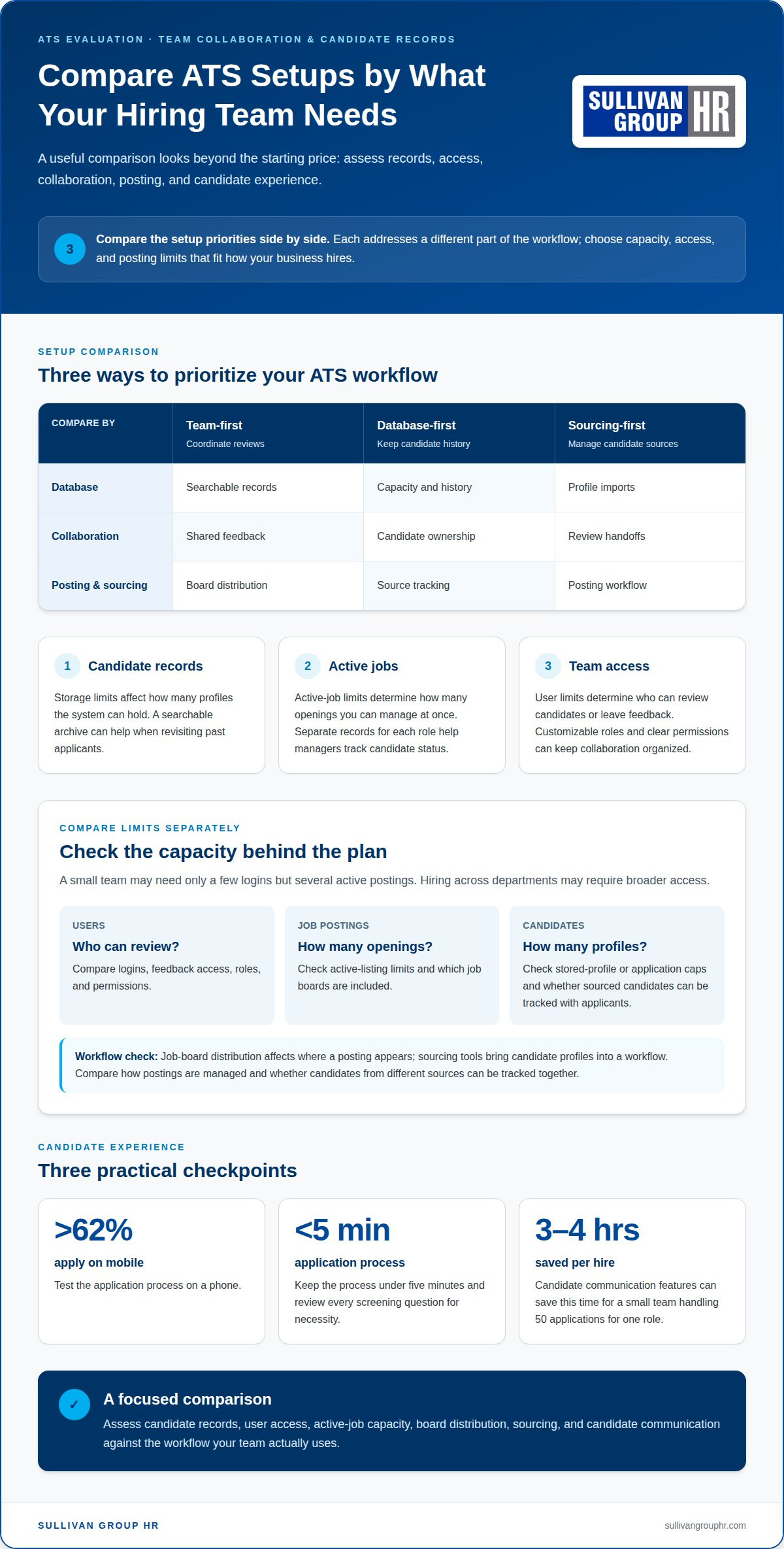
Candidate storage limits determine how many profiles a system can hold, while active job limits determine how many openings you can manage at once. These address different needs: a searchable archive helps when you revisit past applicants, while enough active-job capacity matters when several roles are open. Keeping a separate record for each role makes it easier for hiring managers to track a candidate’s status without relying on manual notes.
User, Job, and Candidate Caps
User limits determine who can review candidates or leave feedback. Job-posting limits restrict the number of active listings, while candidate caps limit stored profiles or applications. Compare each limit separately. A small team may need only a few logins but several active postings; hiring across departments may require broader access. Customizable roles and clear permissions can keep collaboration organized.
Job-board distribution affects where a posting can appear, while sourcing tools help bring candidate profiles into one workflow. Compare which boards are included, how postings are managed, and whether sourced candidates can be tracked alongside applicants. Moving between separate spreadsheets can make ownership and follow-up harder to manage.
Candidate experience matters, too. More than 62% of applicants apply on mobile, so test the application on a phone. Keep the process under 5 minutes, and review every screening question for necessity. Candidate communication features can save three to four hours per hire for a small team handling 50 applications for one role.
| Option to assess | Database | Collaboration | Posting and sourcing |
|---|---|---|---|
| Team-first setup | Searchable records | Shared feedback | Board distribution |
| Database-first setup | Capacity and history | Candidate ownership | Source tracking |
| Sourcing-first setup | Profile imports | Review handoffs | Posting workflow |
Choose a setup with capacity, access, and posting limits that fit your hiring workflow.
What is an applicant tracking system (ATS)?
An ATS is recruiting software that organizes applications, resumes, communication, and hiring stages in one platform. In 2026, the best option is the one that fits your recruiting volume, team workflow, and reporting needs. For payroll, HR, and job-board connections, choose a platform with integrations matching the systems your business uses.
Solo Recruiter and Small-Team Software
Software for a solo recruiter or small team should support core tasks such as collecting applications, reviewing resumes, and coordinating interviews. A standalone ATS focuses on recruiting, unlike a broader HR platform that also supports other parts of the employee lifecycle. For example, one recruiter can move candidates through review and interviews without maintaining separate spreadsheets. If video interviews are part of your process, check whether the system includes that feature.
ATS and Bundled HRIS Hiring Tools
A standalone ATS focuses on hiring, while a broader HR platform can connect recruiting with employee information and other HR processes. This distinction matters when new-hire records need to carry over into the systems used after recruitment. A bundled platform may reduce the need for separate tools, while a dedicated ATS may offer more recruiting-focused workflows. Compare how hiring connects with payroll instead of assuming a bundle shares data automatically.
Hiring Pipelines and Workflow Automation
A hiring pipeline shows a candidate’s progress through stages such as application review, screening, interview, and decision. Workflow automation can assign the next step, prompt feedback, or send a status update as a candidate advances. In a manual process, hiring managers may instead track progress through messages or spreadsheets. Keep each stage clear, with an owner and a decision that moves candidates forward.
Reporting and Hiring Analytics
Reporting turns pipeline activity into information for improving recruiting. An ATS report might show an average of 20 days from application to initial screening. Use reports to identify where candidates wait, which stages need attention, and whether hiring managers complete reviews promptly. Check whether the platform can filter results by role or stage. If hiring connects with payroll administration, a clear handoff can also support coordination after selection.
Review how payroll administration and hiring workflows fit together when evaluating your process.
Small-business pricing and scalability
ATS pricing depends on features, usage limits, and how your hiring needs may change. U.S. hiring rules can affect job-ad wording, screening criteria, and candidate records. Set up consistent, job-related workflows and limit access to the people who need it.
Pricing and Plan Limits
A plan’s limits define what the subscription includes, such as active job postings, user access, candidate storage, or integrations. Test them against a realistic hiring example: several managers may need to schedule interviews, share feedback, and connect job boards even when hiring volume is modest. A low starting price may lead to higher costs if essential features require an upgrade.
Free Plans
A free plan may suit a business testing a basic job posting and candidate workflow. Its value depends on whether the included tools cover the whole process, from application review to interview coordination. If managers still track feedback in separate files, the plan may shift work rather than simplify it. Treat a free option as a possible fit for current needs, not as proof that it will scale.
Plan Tiers
Tiered plans group features into levels, so each upgrade should address a specific hiring need. Compare entry and higher tiers for integrations, posting distribution, scheduling, and reporting. If another hiring manager joins, check whether shared access is included or requires an upgrade. Choose a tier by matching each feature to a step your recruiting process uses.
Pricing Models
Pricing models may charge by subscription period, user, job posting, or hiring volume. Each makes a different factor drive the cost: per-user pricing varies with team access, while per-posting pricing follows the number of open roles. For a service quote, the price depends on the case and is provided after a quote request. Hiring volume, user access, integrations, and support needs shape the scope. Review renewal terms as well as the pricing model.
When hiring grows from one role to several, revisit plan limits before expanding job-board distribution or adding users. Check that the additional features support a real workflow need, such as scheduling interviews or collecting feedback in one place.
Applicant tracking system
Choosing an ATS depends on hiring volume, workflow, and the time available for recruiting. These answers can help you decide when software may be useful, what setup involves, and when to review your system.
When does an ATS become worthwhile?
Automation and AI screening or scoring are worth considering when hiring reaches 5 or more people annually. At lower volume, a clear manual process may still work if applications, feedback, and follow-ups stay organized. As volume rises, an ATS can give hiring managers a shared view of candidate progress and reduce missed handoffs.
What should onboarding prepare your team to do?
Start by mapping your hiring workflow from application review to decision. Set up the stages, assign an owner to each, and decide which candidate messages need a consistent template. Then transfer current openings and relevant candidate records into the platform. Before the first candidate enters the pipeline, make sure hiring managers know where to leave interview feedback.
How often should you review an ATS?
Review your ATS every 18-24 months, and sooner if hiring needs shift substantially. Compare current volume with the system’s active jobs, users, and candidate capacity. Also examine whether managers use its workflow or still rely on separate spreadsheets. A system that once fit a solo recruiter may no longer support broader collaboration or changing recruiting needs.
Can an ATS improve the candidate experience?
An ATS can make applications and communication easier to manage, but the workflow still needs thoughtful setup. Keep instructions clear, make each stage purposeful, and provide timely status updates. Candidates should know what happens after they submit a resume. Review the application process on a mobile device and remove unnecessary steps.
For support aligning hiring workflows with an applicant tracking system, explore the available service.
Sullivan Group HR: Applicant Tracking System
Sullivan Group HR offers applicant tracking, screening, and onboarding through its HIRE solution. It can be a practical next step when managing applications, coordinating reviews, or keeping recruiting aligned with broader workforce needs takes too much manual effort.
For businesses managing hiring alongside broader human capital management, Sullivan Group HR also offers HCM, Payroll Outsourcing, and Payroll Administration. These services support different parts of workforce operations, so the right combination depends on your needs. An ATS supports the hiring process, while payroll services support payroll operations.
Ready to discuss how hiring support could fit your business? Contact Sullivan Group HR.
Build a Hiring Process That Can Grow With You
Start by defining what a better hiring process should make possible. Consider how candidates move from application to decision, who needs to contribute, and how hiring connects with the rest of your workforce operations. This will help you choose an applicant tracking system for a small business that serves a clear purpose.
Sullivan Group HR offers applicant tracking, screening, and onboarding, along with HCM, Payroll Outsourcing, and Payroll Administration. These services support different parts of workforce management as your needs evolve. Start with the hiring challenge you want to address and consider how it fits into your broader operations.
Ready to discuss your hiring needs and possible next steps? Contact Sullivan Group HR. You can take the next step with a clearer plan and a process built around your business.
Frequently Asked Questions
How much does an ATS system cost for small businesses?
ATS costs vary by pricing structure and the features your team needs. Compare the total cost over the same period, including setup charges, optional features, and additional user access where applicable. A lower starting price may not cover the tools your hiring process needs, so measure the total against your actual requirements.
What ATS features support small companies?
Useful features depend on where your hiring process gets stuck. Customizable application forms can collect role-specific details, while saved message templates can make candidate updates easier to manage. Searchable records help you find past applications, and permission settings define who can access candidate information. Prioritize tools that address real bottlenecks rather than features that simply appear in a plan.
Can an ATS reduce hiring bias?
An ATS can support a more consistent review process, but software alone cannot remove hiring bias. Set clear, job-related evaluation criteria before reviewing applications, then apply them consistently to every candidate. Structured scorecards, for example, can help interviewers record evidence against shared requirements. Keep people involved in the review and examine screening settings to ensure qualified applicants are not unfairly excluded.
Do You Need an ATS If You're Only Hiring a Few People a Year?
Not necessarily. A simple process may work if application records, interview notes, and follow-ups remain easy to manage. Consider an ATS if hiring tasks take time away from other responsibilities, candidates are overlooked, or several people need to coordinate decisions. The key question is whether a system can solve a recurring problem your current method handles inefficiently.
How do I migrate from spreadsheets to an ATS?
Begin by identifying which spreadsheet fields and candidate records are still useful. Remove duplicates, standardize job titles and statuses, then map each field to its counterpart in the ATS. Import a small set of records and check them for accuracy before moving the rest. Finally, direct new applications into the ATS and set a clear date to stop updating the old spreadsheet.
What is an applicant tracking system (ATS) for small businesses?
An ATS is software that helps a business manage job applications and candidate information in a structured recruiting process. For example, it can keep a candidate’s resume, interview notes, and application status together for a specific opening. Authorized team members can then share a record of hiring activity instead of reconstructing a candidate’s progress from separate email threads.


