
A workers’ comp audit is a chance to verify that your records match your actual payroll and job duties. A surprise premium adjustment can still put pressure on your budget, so manage workers comp audit preparation before the auditor asks. Organize payroll records, review employee classifications, and gather subcontractor certificates of insurance for the policy period.
If you’re worried about confusing NCCI codes or spending hours gathering records by hand, you’re not alone. An audit can turn into a scramble when information is scattered across systems. A repeatable process helps you spot discrepancies early and respond with relevant records.
This guide walks you through preparing documentation, reviewing classifications, responding to the auditor, and creating a process you can reuse. You’ll also see how Sullivan Group HR’s workers’ compensation support and isolved HCM platform can help organize workforce information for review.
Key Takeaways
- Learn how physical, mail-in, and virtual audits compare actual payroll and job duties with policy estimates.
- Build a chronological documentation checklist to reduce last-minute searching and keep policy-period records organized.
- Understand why employee classifications depend on the work performed, and why office roles may not automatically qualify for Code 8810.
- Choose a designated point of contact and prepare a focused meeting setup to keep auditor conversations clear.
- Use integrated HCM tools and a repeatable readiness process to make audit preparation more consistent.
Understanding the Workers’ Compensation Audit Process
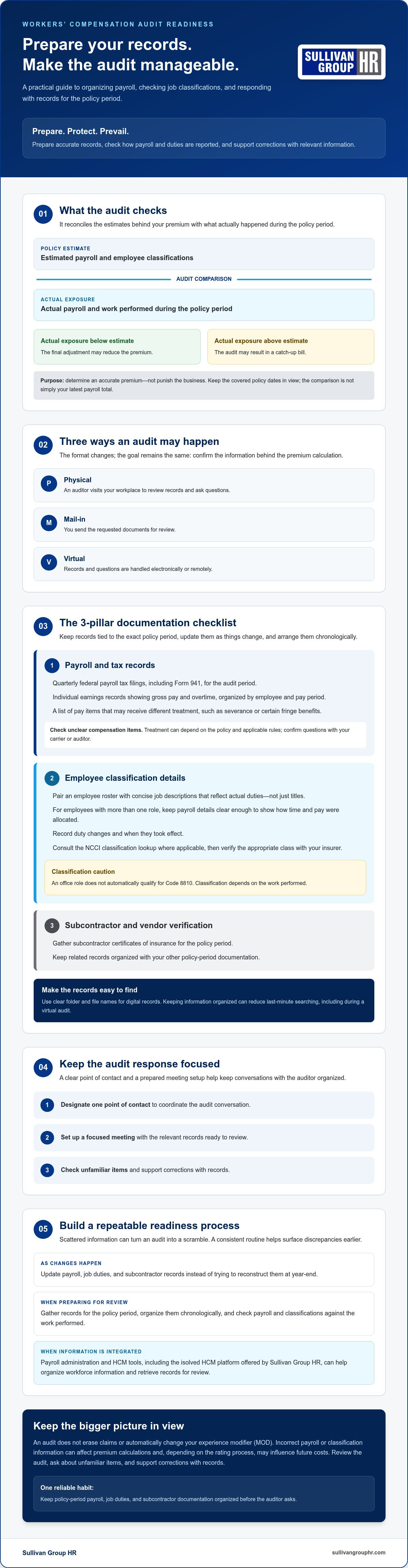
Could an audit result in a refund instead of a catch-up bill? Yes. A workers’ compensation audit reconciles the estimated payroll and classifications used to set your premium with the actual payroll and work performed during the policy period. If actual exposure was lower than estimated, the final adjustment may reduce the premium. The purpose is to determine an accurate premium, not to punish the business.
Audits may be handled in three ways:
- Physical: An auditor visits your workplace to review records and ask questions.
- Mail-in: You send requested documents for review.
- Virtual: Records and questions are handled electronically or remotely.
The format varies, but the task is similar: confirm the information behind the policy’s premium calculation. The process is part of the broader U.S. workers' compensation system, where requirements and procedures can differ by state. To manage workers comp audit preparation, follow a practical sequence: Prepare. Protect. Prevail. Prepare accurate records, check how payroll and job duties are reported, and respond to discrepancies with supporting information.
Why Do Insurers Audit Your Payroll?
Payroll helps measure the amount of work-related exposure covered by a policy. If your workforce grew, shrank, or changed during the year, actual payroll may differ from the estimate used when coverage began. For example, seasonal hiring can raise payroll above the original projection, while reduced staffing can bring it below that estimate. The audit compares actual exposure with the policy’s classifications and records.
Workers’ compensation requirements are shaped by state rules, so an audit also helps verify that reported information aligns with the applicable policy and requirements. Keep the policy period in view. The comparison concerns the covered dates, not simply your latest payroll totals.
The Impact on Your Experience Modifier (MOD) Rate
Your experience modifier, often called a MOD rate, compares your business’s claim experience with expected losses for similar businesses. It is not a simple grade. The calculation reflects loss history and other rating inputs, which can include payroll and classification data.
An audit doesn’t erase claims or automatically change your MOD. However, incorrect payroll or classification information can affect premium calculations and, depending on the rating process, may influence future costs. Unresolved discrepancies can also lead to adjustments for the policy period under review. Check the audit carefully, ask about items you don’t recognize, and support corrections with records. This helps keep the current reconciliation and the information used going forward accurate.
Preparing Your Documentation: The 3-Pillar Checklist
A calmer audit starts before the request arrives. Update payroll, job duties, and subcontractor records as changes happen instead of trying to reconstruct them at year-end. Keep records tied to the exact policy period and arrange them chronologically. If you digitize files, use clear folder and file names so the right documents are easy to locate and share during a virtual audit.
Payroll administration tools can make report gathering more efficient. Sullivan Group HR provides payroll administration and the isolved HCM platform, which can help retrieve workforce data without a manual search through paper files. Learn more about payroll administration outsourcing and how it can support organized records. Use this three-pillar checklist to prepare your audit materials.
Pillar 1: Payroll and Tax Records
Gather records that show what you paid during the policy period. A focused file set may include:
- Quarterly federal payroll tax filings, including Form 941, for the audit period.
- Individual earnings records showing gross pay and overtime, organized by employee and pay period.
- A list of pay items that may receive different treatment, such as severance or certain fringe benefits.
Don’t assume a type of compensation is automatically excluded. Treatment can depend on the policy and applicable rules, so flag unclear items and confirm them with your carrier or auditor.
Pillar 2: Employee Classification Details
Pair an employee roster with concise job descriptions that reflect actual duties, not just titles. If an employee performs more than one role, keep payroll details clear enough to show how their time and pay were allocated. Record duty changes and when they took effect. For classification research, consult the NCCI employee classification lookup where applicable, then verify the appropriate class with your insurer.
Pillar 3: Subcontractor and Vendor Verification
Keep a payment ledger for 1099 contractors alongside current Certificates of Insurance (COIs) for subcontractors. Check whether each certificate covers the period when the work was performed. Without valid proof of coverage, a subcontractor’s labor may be treated as uninsured exposure and included in your premium calculation, depending on the policy and applicable rules. Track certificates alongside contracts and invoices to make gaps easier to identify.
As a practical next step, review payroll and workers’ compensation records together. Sullivan Group HR’s payroll administration and workers’ compensation support can help businesses simplify the work of maintaining audit-ready information.
Navigating Employee Classifications and Subcontractor Risks
Classification follows the nature of the work, not the title on an employee’s business card. A “coordinator” who regularly works on a production floor may have different exposure from one who performs office duties. Likewise, an office employee doesn’t automatically qualify for Code 8810, the clerical classification. Work location, duties, and applicable classification rules can affect eligibility.
Start with the rules that apply to your policy and state. The National Council on Compensation Insurance (NCCI) provides classification guidance for jurisdictions that use its system. Other states may use different authorities. Review the relevant NCCI classification information and confirm questionable assignments with your insurer. If you believe a code doesn’t reflect the actual work, provide job descriptions, payroll records, and details about where duties are performed. Documentation gives the insurer a factual basis to review the assignment.
1099 Contractors: Verify More Than the Label
Calling a worker an independent contractor or issuing a 1099 doesn’t, by itself, determine how the relationship is treated for workers’ compensation. Auditors may scrutinize payments to contractors who lack their own workers’ compensation coverage. Depending on the policy and applicable rules, their labor may be included in your exposure. A “right to control” analysis considers the working relationship, including who directs how the work is done, but the test and its application can vary by state. Check applicable requirements rather than relying on a single factor.
Set a written screening standard: “We treat a subcontractor as audit-ready only when the working relationship is documented and we have verified a current certificate of workers’ compensation insurance covering the period of work, or confirmed the applicable requirements with our insurer.” Keep the certificate with the contract and payment records. A structured HR risk management strategy can help make contractor vetting consistent instead of a last-minute search.
Prevent Classification Scope Creep
Some systems recognize standard exceptions, such as clerical or outside sales classifications, but employees must meet the applicable criteria. Don’t assume an office location alone qualifies someone as clerical. Also ask how the policy applies its governing classification. If records don’t support a separate eligible class, lower-risk work may be grouped under a broader classification, depending on the rules.
Document duties and payroll clearly by role or department, and record changes when they happen. When an employee has more than one function, preserve the time and pay details needed to show the work performed. This gives your insurer a factual basis to review the classification and helps you answer audit questions with records rather than guesswork.
Best Practices for Managing the Audit Meeting
A well-run audit meeting is organized, respectful, and focused. Before it begins, choose one point of contact who understands the records and can coordinate answers. Ask other employees to direct audit questions to that person instead of offering separate explanations. For an in-person meeting, prepare a quiet space. For a virtual audit, set up a private, organized way to share files.
Be cooperative and transparent while keeping the review focused. Provide complete responses and the documents requested for the policy period. Don’t provide unrestricted access to filing cabinets or unrelated records. If a request seems broader than the audit, ask the auditor to clarify what is needed. If you need time to verify an answer, say so and follow up with accurate information rather than guessing.
Control the Scope of the Conversation
Answer questions directly, then pause. Extra details can introduce issues that aren’t relevant or may be misunderstood without context. Keep a written log of documents shared, questions asked, and topics the auditor examines closely. This creates a useful record for follow-up and helps identify items that may need more explanation. A calm, collaborative tone supports a productive review while keeping the exchange focused on the audit.
Review the Findings and Follow Up
Before the meeting ends, ask whether the auditor can provide a summary of preliminary findings or explain the next steps. Review any available work papers for straightforward errors, such as duplicate payroll entries, incorrect employee details, or a class code that doesn’t match documented duties. If something appears wrong, point to the relevant record and ask how the auditor reached the result.
If you disagree with the final audit, check the insurer’s instructions and your policy documents for the formal review or dispute process, including any submission deadlines. Send a concise written explanation with supporting records, and keep copies of what you submit. Don’t assume that a conversation alone changes the result. Request confirmation of the outcome in writing.
Good meeting habits turn preparation into a clear, documented review. To get support coordinating workers’ compensation information and payroll records, connect with Sullivan Group HR.
Simplifying Compliance with Integrated HCM Solutions
Audit preparation shouldn’t mean searching through a year’s worth of disconnected files. Aim for ongoing readiness: keep payroll and workforce information organized throughout the policy period so an audit request becomes a review rather than a scramble. Integrated human capital management (HCM) tools can help bring key records together and reduce repetitive manual work.
Technology can organize data and support calculations, but people still need to confirm that records reflect actual work. Treat system reports as a starting point, not a substitute for checking policy dates, payroll details, employee duties, and insurer requirements. This approach makes audit preparation more consistent and leaves more time for employees and business priorities.
Use the isolved Platform to Support Readiness
Sullivan Group HR provides access to the isolved HCM platform, alongside payroll administration and workers’ compensation support. Centralized workforce and payroll information can make it easier to find relevant records when preparing for an audit, rather than gathering everything manually from separate sources. Available reports and data depend on your setup, so confirm which policy-period details the platform can provide and what the auditor requires.
Document employee role and duty changes as they happen, then review them against payroll records. A system can help organize that information, but don’t assume it automatically assigns classifications or tracks every change in a way that satisfies your carrier. Verify records before sharing them, and ask your provider how payroll and workers’ compensation information can be coordinated for your audit process.
Pair Technology with a Dedicated HR Partner
A platform can streamline record handling. An HR partner can help you understand the information, prepare for questions, and identify details that may need review. Sullivan Group HR offers payroll and workers’ compensation support to help simplify administrative demands, along with professional human resources consulting. This support can make compliance tasks more manageable when audit requests compete with daily operations.
Use the time saved on file gathering to focus on your employees and business priorities. Technology can handle repetitive administration, while your team and HR partner provide context and judgment. Together, they can make audit readiness a routine rather than a once-a-year rush.
Build a More Predictable Audit Process
A smoother workers’ comp audit starts with accurate records maintained throughout the policy period. Keep payroll and job-duty information organized, review classifications against actual work, and verify subcontractor coverage before the audit begins. During the review, answer questions clearly, provide requested records, and check the findings for errors.
These habits can reduce last-minute pressure and create a repeatable process for future audits. Integrated payroll administration, access to the isolved HCM platform, and workers’ compensation support from Sullivan Group HR can help you organize information and prepare for review.
Frequently Asked Questions
What happens if I fail a workers’ comp audit?
A workers’ comp audit isn’t usually a pass-or-fail test. It reconciles estimated payroll and classifications with actual policy-period information. If you don’t provide requested records, the insurer may calculate the premium using the information available or apply procedures in your policy, which could result in an adjustment. Review the audit notice, respond by the stated deadline, and contact your insurer if you need clarification or more time.
How long does a workers’ comp audit usually take?
There’s no single timeline for every audit. The duration depends on the audit format, how many records need review, and whether payroll, job duties, or subcontractor coverage need clarification. A straightforward document review may move faster than an audit involving multiple locations or incomplete records. Ask the insurer or auditor what to expect, and organize policy-period documents so you can respond efficiently to follow-up questions.
Can I dispute the results of my workers’ comp audit?
Yes, you can question findings you believe are incorrect. Compare the audit statement with your payroll records, job descriptions, policy dates, and subcontractor documentation. Identify each disputed item and provide records that support your position. Follow the insurer’s formal review or dispute instructions, including any deadlines in the policy or audit notice. Keep copies of your correspondence and ask for the outcome in writing.
Do I need to pay the auditor at the time of the meeting?
Typically, the auditor reviews records on behalf of the insurer and doesn’t collect your premium payment during the meeting. If the audit results in an additional premium or credit, the insurer will explain the adjustment and payment instructions separately. Check your policy and any audit correspondence for the process that applies to you. If someone requests payment during the meeting, verify the request directly with your insurance carrier before paying.
What is a “voluntary” audit vs. a physical audit?
A voluntary audit generally means the insurer asks you to provide information or complete audit forms, often without an on-site visit. A physical audit involves an auditor visiting your workplace to examine records and ask questions. Terminology and procedures can vary by insurer, so check the notice to confirm the format, required documents, and submission method. Respond fully either way. A voluntary format doesn’t remove the need for accurate information.
How far back can an insurance company audit my records?
A premium audit normally focuses on the policy period named in the audit notice. The notice and your policy documents should identify the dates and explain what records the insurer needs. Requirements for retaining records and the insurer’s audit rights can vary by policy and applicable state rules, so don’t assume one lookback period applies everywhere. If the request covers dates outside the stated period, ask the insurer to clarify its scope.
Does a workers’ comp audit affect my insurance premium for next year?
An audit reconciles the premium for the policy period being reviewed, and the result may be an additional charge or a credit. The final audited information may also inform future premium calculations, depending on the insurer, policy, and rating rules. That doesn’t mean every audit automatically raises next year’s premium. Check the audit statement against your records and ask your insurer how the adjustment may affect your renewal estimate.
Are 1099 independent contractors always included in the audit?
No. A 1099 tax form alone doesn’t determine whether a contractor’s payments are included in an audit. The insurer may consider the working relationship, the work performed, applicable rules, and whether the contractor has valid workers’ compensation coverage. Keep contracts, payment records, and current certificates of insurance together. To manage workers comp audit questions about contractors, ask your insurer how it evaluates their work and documentation under your policy.


