

What if your team’s hours could flow from timekeeping into payroll without a last-minute hunt through scattered records? For employers juggling manual timesheets, different schedules, or multiple work locations, even small gaps can make payroll preparation harder. Time and attendance systems help organize hours worked, but the right fit depends on how your people work and how time records connect to your other processes.
This guide explains what these systems track, what to compare when evaluating options, and how to plan for implementation and employee adoption. You’ll also learn what to check when connecting time records with payroll and broader workforce needs. Sullivan Group HR provides access to the isolved HCM platform, which includes time and attendance tracking alongside payroll administration and other HR services. The aim is a clearer process for recording, reviewing, and preparing hours, with practical support available as part of the picture.
Key Takeaways
- Learn how time and attendance systems capture work hours and organize records for review, scheduling, and payroll preparation.
- Compare spreadsheets, time clocks, and software based on employee access, review steps, reporting, and payroll connections.
- Map pay periods, schedules, approvals, exceptions, and payroll handoffs before assessing system options.
- Test realistic workflows and plan employee training so the approach fits how your workforce operates.
- Confirm what a payroll or HR connection includes, since integration scope and functionality can vary.
What Are Time and Attendance Systems, and What Do They Track?
A time and attendance system records when employees work and organizes that information for review. A basic clock captures a punch. Depending on its capabilities and setup, a system can organize entries by employee and help employers review attendance, schedules, and hours before payroll is prepared. The Time and attendance system overview describes the range of approaches, from manual tracking to automated tools.
In brief: A time and attendance system captures and organizes employee work-time data so authorized staff can review attendance and prepare hours for payroll.
Features vary. Clock-in and clock-out capture is common, while schedule comparisons, approvals, exception alerts, reporting, and connections to other systems depend on the product and configuration. Separate essential functions from optional features when evaluating providers. Don’t assume every system handles the same tasks.
What information does a time and attendance system record?
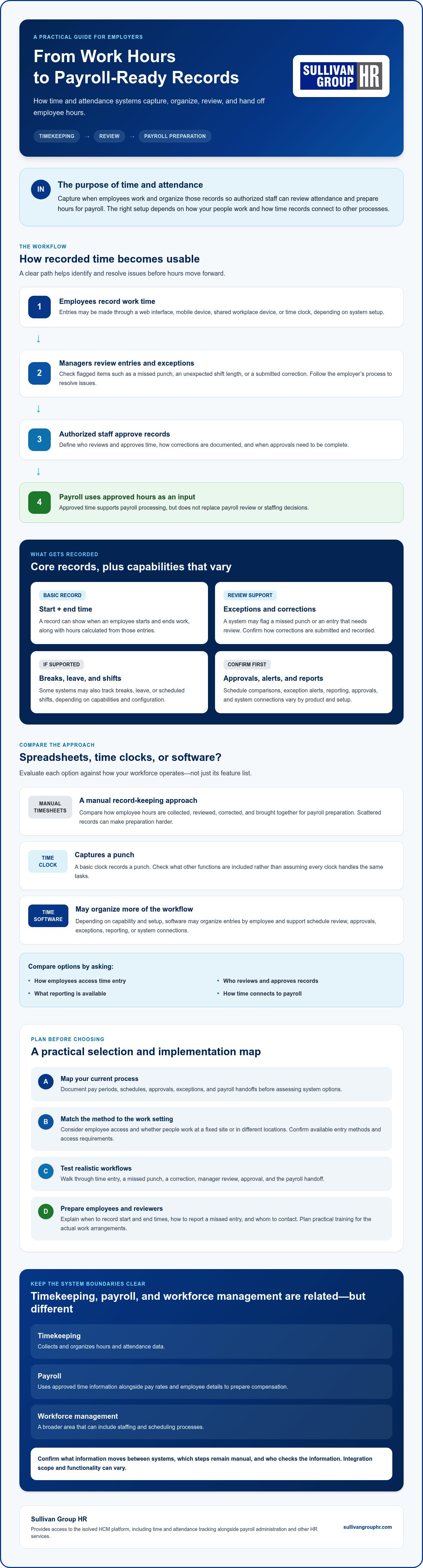
At its simplest, a record shows when an employee starts and ends work, along with the hours calculated from those entries. A system may flag a missed punch or a time entry that needs review. If supported, it may also track breaks, leave, or scheduled shifts. Before choosing, confirm what data is captured, how corrections are submitted and recorded, and who can review or approve them.
How is timekeeping different from payroll and workforce management?
Timekeeping collects and organizes hours and attendance data. Payroll uses approved time information alongside pay rates and employee details to prepare compensation. Workforce management is broader and can include staffing and scheduling processes. These functions may connect, but they aren’t interchangeable. Ask what information moves between them and which steps still require manual handling.
For example, a manager might compare an employee’s recorded hours with a scheduled shift, resolve a missing punch, and approve the time record. Payroll can then use the approved hours as an input, subject to the employer’s process and system setup. The record supports that workflow, but it doesn’t replace payroll review or staffing decisions.
Understanding these boundaries makes it easier to compare options. Sullivan Group HR provides access to the isolved HCM platform, which includes time and attendance tracking alongside payroll administration and other HR services. For any platform, confirm the specific functions and connections available to your organization rather than relying on a general feature label.
How Time and Attendance Systems Turn Work Hours into Usable Records
Recorded time becomes useful when it follows a clear path from employee entry to payroll review. In a typical workflow, employees record time, a manager checks exceptions, authorized staff approve the records, and payroll uses approved hours as an input. The exact steps depend on the employer’s policies and the system selected.
Time-record workflow: Employees submit work-time entries, managers review and resolve exceptions, authorized staff approve the records, and payroll uses the approved hours as an input for processing.
Review helps catch issues before records move forward. A missed punch, unexpected shift length, or submitted correction can be checked while the details are still clear. Managers can request clarification and follow the employer’s correction process instead of leaving payroll staff to find an unresolved issue later. Define who reviews entries, how corrections are documented, and when approvals must be complete.
How do employees record their time?
Depending on the system and its configuration, employees may enter time through a web interface, mobile device, shared workplace device, or time clock. Choose a method that suits the work setting. A shared device may work for a fixed worksite, while web or mobile access may be relevant for employees working in different locations. Confirm which methods are available, whether employees can access them, and what training they’ll need.
Clear procedures support consistent use. Explain when employees should record start and end times, how to report a missed entry, and whom to contact with questions. Keep instructions practical and aligned with actual schedules and work arrangements. Employees are more likely to follow a process they understand and can use reliably.
How do approvals and payroll handoffs work?
Supervisors typically review timesheets and flagged exceptions, then check employee-submitted corrections before approving records. Approved time data may transfer to payroll or be made available for payroll processing. The handoff varies, so ask the provider what moves between systems, what remains manual, and who is responsible for checking the information.
Before selecting a system, confirm the integration scope, data ownership, and correction procedures. Ask how changes are recorded, who can make them, and how payroll staff can identify approved records. A clearly defined handoff sets responsibilities without assuming the technology makes every decision automatically.
Sullivan Group HR provides access to the isolved HCM platform, which includes time and attendance tracking alongside payroll administration. Employers assessing connected processes can discuss timekeeping and payroll needs with Sullivan Group HR, including the support that may fit their workflow.
Manual Timekeeping, Time Clocks, and Software: What Should Employers Compare?
No single timekeeping method suits every employer. A small team with consistent schedules may manage with a straightforward manual process, while shift-based or distributed teams may need other ways to record and review hours. Compare the day-to-day workflow, not just the feature list. The right approach should fit how employees work and how approved records reach payroll.
| Method | Setup effort | Employee access | Review workflow | Reporting and payroll connection |
|---|---|---|---|---|
| Spreadsheet or other manual record | Often simple to start, but depends on how records are organized and maintained. | Employees submit time through the employer’s chosen process. | Managers check entries and corrections manually. | Reports may need to be built by hand; payroll information may need manual entry. |
| Standalone time clock | Requires choosing and setting up a clock for the worksite. | Usually centered on access to the physical clock. | Review may involve examining records or exporting them, depending on the device and process. | Reporting and payroll connections vary. Confirm what the specific clock supports. |
| Software-supported timekeeping | Requires configuration, employee setup, and process decisions. | May offer web, mobile, shared-device, or clock entry, depending on the system. | Review tools vary, so check how managers handle entries and exceptions. | Reporting and payroll connections depend on the system and its setup. |
When can manual time tracking still work?
A manual process may be practical for a small group with stable schedules, few time-entry changes, and a clear review routine. It still depends on consistent recordkeeping and careful checks. As records grow, recurring corrections, chasing submissions, or transferring hours into payroll can put pressure on the process. Treat those repeated tasks as reasons to reassess, not as proof that a particular tool is automatically the answer.
Which system capabilities matter for different workforces?
Start with the work itself. Fixed-location teams may value an easy-to-reach clock or shared device. Mobile employees may need a way to submit time away from a central workplace. Shift-based and multi-location teams may need clear manager oversight across schedules and sites. In every case, check employee usability, device access, and how exceptions are handled.
Biometric or location-based tools may be available, but don’t assume they’re necessary or suitable. Confirm what the system collects and how it works, and assess relevant privacy or other requirements for your organization. Features and integrations vary, so ask providers to demonstrate the workflows you expect to use. Focus your comparison on fit, review effort, and payroll handoffs, not the longest feature list.
How to Choose and Implement a Time and Attendance System
A useful selection process starts with your actual workflow, not a vendor’s feature list. Use these five steps to compare options and prepare your team:
- Map your needs. Document current pay periods, schedules, approval steps, common exceptions, and how time records reach payroll.
- Define requirements. Identify how employees need to enter time, who reviews records, which reports are useful, and which existing payroll or HR tools must connect.
- Compare options. Assess each proposal against the same requirements. Clarify which functions are included in the proposed configuration and which require additional setup or manual work.
- Test workflows. Ask providers to demonstrate realistic employee and manager tasks, such as submitting time, correcting a missed entry, reviewing an exception, and approving a record.
- Prepare the rollout. Assign owners, plan training and communication, and establish how questions and corrections will be handled.
Keep requirements grounded in your workforce. A system should support your schedules, locations, and approval responsibilities while fitting the way payroll is prepared. Treat federal, state, and local wage-and-hour requirements as matters to verify with qualified advisers. Don’t rely on a vendor demonstration alone to determine what applies to your organization.
What should employers ask during a system evaluation?
Ask which time-entry methods, approval steps, and reports are included in the proposed configuration. Have the provider explain how data exchanges with your existing payroll and HR tools, and what remains manual. Clarify employee and manager training, support arrangements, data access, security practices, and who will administer the system after setup. Ask for specific examples of how records and corrections are handled.
How can employers support a smoother rollout?
Assign clear owners for configuration, employee communication, and manager training. Before organization-wide adoption, pilot representative schedules and exception scenarios, including the correction process employees will use. Gather questions, review early usage, and adjust instructions or procedures where needed. A practical rollout gives people a clear way to learn the process and raise issues.
If you’re assessing time and attendance systems alongside payroll and HR needs, discuss your requirements with Sullivan Group HR. Sullivan Group HR provides access to the isolved HCM platform, which includes time and attendance tracking alongside payroll administration, and also offers HR consulting.
Connecting Time and Attendance with Payroll and HR Support
Time records feed into a payroll process that also relies on employee and pay information, while HR teams manage related workforce responsibilities. When these processes are connected, staff may have fewer repeated steps for handling information. The practical benefit depends on what the systems share and how your organization manages approvals.
What changes when time tracking connects with payroll?
A connected workflow can make reviewed time records available for payroll preparation instead of requiring staff to re-enter every approved hour. The handoff still needs oversight. Employers remain responsible for setting approval practices, resolving corrections, and checking records before payroll is processed. Ask which information moves between systems, whether the exchange is automatic or requires an action, and how changes are reflected.
For a closer look at the payroll side of this process, consult a payroll administration outsourcing guide. Confirm the integration scope before choosing a provider. Systems can differ in the data they exchange, the steps they support, and the work that remains with your team.
How can an HCM platform fit a broader HR process?
Human capital management (HCM) brings together processes and services related to managing a workforce. Time and attendance is one part of that broader picture, not a complete solution to every payroll or HR need. Assess how time records fit alongside payroll administration and other responsibilities, then identify where technology and human support are both useful.
Sullivan Group HR provides clients access to the isolved HCM platform, which includes time and attendance tracking alongside payroll administration and other HR services. Sullivan Group HR also offers HR consulting. This is one option for employers exploring timekeeping as part of connected HR and payroll support. Confirm how each process and system connection would work for your organization.
For additional context, look for guides on workforce management solutions and human capital management, as well as a payroll administration outsourcing guide. As you compare options, ask what’s included, what data is shared, and who handles review and corrections. Clear answers help you see how each component fits your organization’s workflow.
Discuss your timekeeping and HR needs with Sullivan Group HR to explore which requirements matter for your workforce and how they relate to payroll and broader HR support.
Build a Timekeeping Process That Works for Your Team
The right time and attendance systems should fit the way your employees work and give managers a clear process for reviewing hours. Compare options against your schedules, entry methods, approval steps, and payroll handoffs. Test the workflow before rollout so employees and managers know how to record time, resolve corrections, and move approved records forward.
Timekeeping is one part of a broader workforce process. Connected time records, payroll administration, and HR support can help coordinate work, but the details of each system connection matter. If you’re weighing what your organization needs, discuss your timekeeping and HR needs with Sullivan Group HR. Share your workflow and requirements to explore how the isolved HCM platform and Sullivan Group HR’s related services may fit your payroll and HR processes.
Frequently Asked Questions
What is a time and attendance system?
A time and attendance system is a process or software system for recording and organizing employee work-time and attendance information. Depending on the setup, employees may enter time through a web or mobile interface, a shared device, or a time clock. Managers can review records and exceptions before approved hours are used in payroll preparation. Functions vary by provider and configuration, so confirm what the system captures and supports.
How do time and attendance systems work with payroll?
Employees record their time, managers review entries and exceptions, and approved information is made available for payroll processing. Some systems connect with payroll tools, while others use a separate handoff, such as exporting or entering information. Ask what data transfers, how corrections are handled, and who approves records. Employers still need to review payroll inputs and follow the requirements that apply to their circumstances.
Can a small business use a time and attendance system?
Yes. A small business can use a system if it fits the team’s schedules, time-entry needs, and payroll process. A simple tool may be enough, while another business may prefer a broader HR platform. More features aren’t automatically better. Compare employee access, manager review steps, administrative effort, support needs, and any necessary payroll connection. Choose an option that addresses a real process need rather than adding complexity without purpose.
Are time and attendance systems required by law?
Requirements depend on applicable federal, state, and local rules, along with the employer’s specific circumstances. Don’t assume every employer has identical recordkeeping obligations or that using a particular system guarantees compliance. Check current guidance from relevant government agencies, and consult a qualified employment or legal adviser about your responsibilities. A system can help organize records, but employers remain responsible for understanding and meeting applicable requirements.
What features should I look for in a time and attendance system?
Start with practical needs: employee time entry, manager review and approval, exception handling, useful reports, and a workable payroll handoff. Then assess access methods, ease of use, security practices, support, and ongoing administrative effort. Prioritize capabilities that match your schedules and workforce. Ask providers to demonstrate common tasks, such as correcting a missed entry, and explain which features are included, configurable, or require additional services.
Can time and attendance software track remote or mobile employees?
Some systems offer web or mobile time entry, but methods and features depend on the provider and configuration. Consider whether employees can access the system, how managers review entries, and what time-submission procedures your organization will use. If a system includes location-related or biometric features, examine its data practices and assess relevant privacy and legal requirements with qualified advisers before deciding whether to use them.
How do I move from spreadsheets to a timekeeping system?
First document your schedules, pay periods, approval steps, correction practices, and payroll handoffs. Compare systems against those needs, then confirm how employee information and any historical records will be handled. Test representative workflows before launch, including routine time entry and corrections. Train employees and managers, establish a clear route for questions, and review early records so you can identify process issues and update instructions or procedures as needed.


