
What if the biggest enrollment challenge isn’t choosing a benefits platform, but coordinating every step around it? Managing employee benefits enrollment can quickly become a tangle of spreadsheets, reminder emails, missed deadlines, and incomplete elections. When employees aren’t sure how plans differ or what they need to submit, even a well-organized benefits offering can be hard to use.
It’s understandable to want one tool to solve the problem. But successful enrollment depends on a clear process as well as technology. Employees need timely guidance, and HR needs a reliable way to track decisions and follow up. A coordinated approach can make enrollment easier for employees and connect benefits administration with broader HR and payroll workflows.
This guide shows you how to build a repeatable enrollment process, from setting a timeline and assigning responsibilities to explaining plan options and checking elections for missing information. You’ll also learn how human support and HCM technology can work together to keep records organized after enrollment closes. The goal is to help employees make informed choices and give your team a dependable process for each enrollment period.
Key Takeaways
- Managing employee benefits enrollment works best when each stage has a clear owner, timeline, and completion check.
- Compare manual, HCM-supported, and outsourced approaches by the coordination effort, recordkeeping, and employee support each requires.
- Make enrollment messages easy to act on by repeating the key steps, deadlines, and ways employees can get help.
- Connect benefits administration with related HR and payroll workflows to support more organized ongoing administration.
- See how Sullivan Group HR combines employee benefits management, HR support, payroll administration, and access to the isolved HCM platform.
Managing Employee Benefits Enrollment Starts with a Clear Plan
Benefits enrollment is the process of presenting benefit choices to employees, collecting their elections, and recording those choices or changes in the appropriate records. It turns available employee benefits into decisions employees can make and administrators can act on. A defined process tells employees what to review and submit, and clarifies who is responsible for each step.
Managing employee benefits enrollment means planning for more than an annual enrollment period. Annual open enrollment gives eligible employees a scheduled opportunity to review and make benefit elections. New-hire onboarding introduces enrollment to employees joining the organization. Qualifying life event changes address certain updates outside the annual window. Because the processes differ, explain which situation applies, what action employees need to take, and which plan-specific deadlines govern their choices.
What employers need to coordinate before enrollment opens
Bring the moving parts into one plan. Confirm which options will be presented, who is eligible, what decision materials employees need, and who owns each administrative task. Then create a working calendar that allows time to prepare materials, communicate with employees, receive elections, review submissions, and follow up on missing or unclear information.
Assign a named owner to each stage, even when several people contribute. For example, one person might prepare employee communications while another tracks submitted elections. Before sharing instructions, confirm plan details and applicable deadlines with the appropriate benefits professionals. This keeps guidance consistent and gives employees a clear place to direct questions.
How enrollment differs from ongoing benefits administration
Enrollment is a decision and election window. Benefits administration continues after it closes. Elections need to be recorded accurately, employee records kept current, and payroll deductions coordinated with selected benefits. Changes may also arise through onboarding or qualifying life events, so a dependable process must account for updates beyond the annual cycle.
Think of enrollment as one checkpoint in an ongoing workflow, not a standalone project. A clear handoff from election collection to recordkeeping and payroll helps reduce gaps between what an employee selects and what the organization administers. For a broader view of how benefits fit into an employer’s ongoing strategy, explore the Strategic Benefits Management Solutions guide.
A simple planning document can keep the process on track. List each stage, its owner, target date, and completion check. This shared reference gives HR and payroll a common view of progress and sets clear expectations for employees, from the first announcement through follow-up.
How to Manage Employee Benefits Enrollment Step by Step
A reliable enrollment workflow makes the next action clear for employees and administrators alike. Managing employee benefits enrollment is easier when every stage has an owner, a deadline, and a way to confirm the work is complete.
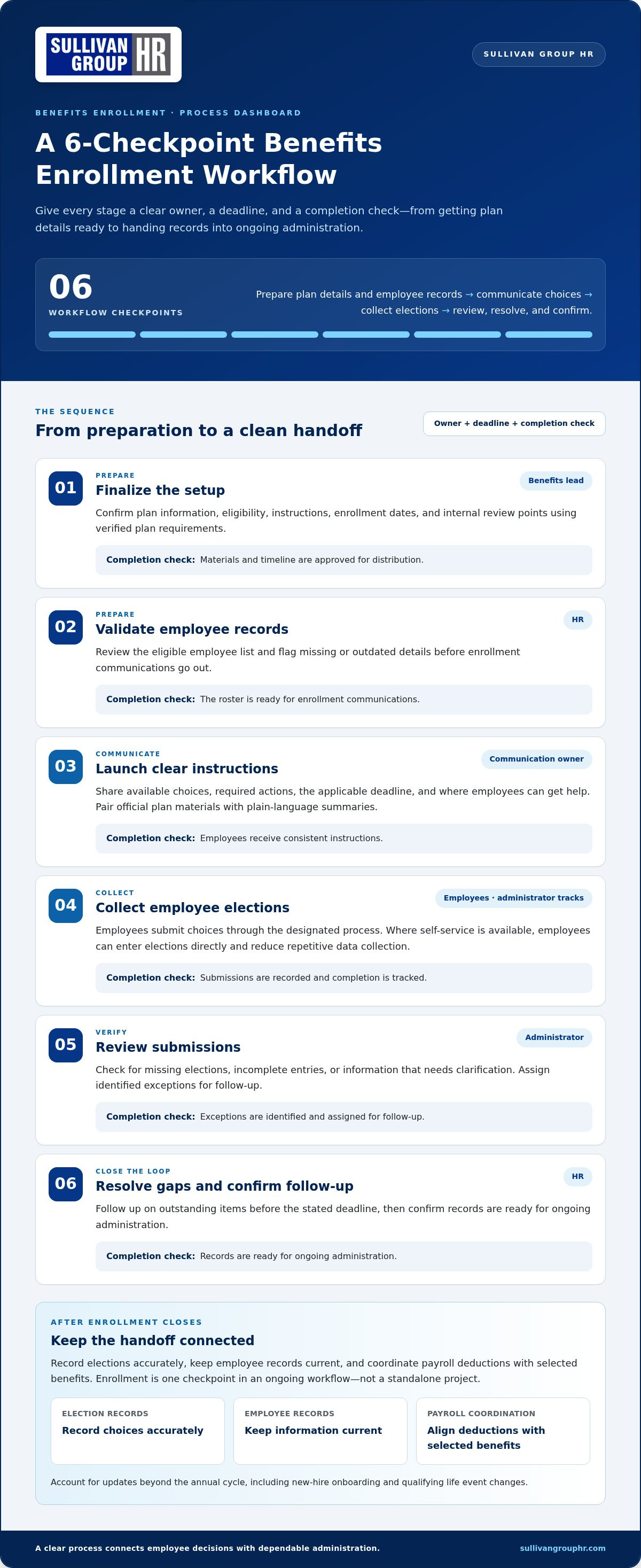
Enrollment sequence: prepare plan details and employee records, communicate choices, collect elections, review submissions, resolve gaps, and confirm follow-up.
Prepare the timeline, plan information, and employee records
Before enrollment opens, gather current plan documents, eligibility information, rates, and election instructions. Set enrollment dates and internal review points using verified plan requirements. Check employee records for missing or outdated information so avoidable data issues don’t slow down elections. Assign an owner to preparation and confirm that materials and records are ready to use.
Communicate choices and collect elections
Pair official plan materials with plain-language summaries that explain available choices without replacing the source documents. Tell employees how to ask questions, submit elections, and correct an error. The Employee Benefits Security Administration is a useful source for federal employee benefits information. Confirm plan-specific details and applicable deadlines with the appropriate benefits professionals.
- Finalize the setup. The benefits lead confirms plan information, eligibility, instructions, and dates. Completion check: materials and timeline are approved for distribution.
- Validate employee records. HR reviews the eligible employee list and flags missing details. Completion check: the roster is ready for enrollment communications.
- Launch communication. The communication owner shares the choices, required actions, deadline, and help channel. Completion check: employees receive consistent instructions.
- Collect elections. Employees submit their choices through the designated process. Where employee self-service is available, it can give employees a direct way to enter elections and reduce repetitive data collection. Completion check: submissions are recorded and completion is tracked.
- Review submissions. The administrator checks for missing elections, incomplete entries, or information that needs clarification. Completion check: exceptions are identified and assigned for follow-up.
- Close the loop. HR follows up on outstanding items before the stated deadline, then confirms records are ready for ongoing administration. Completion check: elections and unresolved questions have a documented status.
Don’t rely on a single announcement. Send concise, consistent reminders that restate what employees need to do, where to get help, and the applicable deadline. Administrator review still matters when employees enter their own choices. Self-service can reduce repetitive follow-up, but it doesn’t replace checks for completeness and accurate records.
For support connecting benefits enrollment with HR and payroll administration, explore Sullivan Group HR’s benefits and HR support.
Manual, HCM-Supported, or Outsourced Enrollment: What Changes?
There isn’t one right way to run enrollment for every organization. The best-fit approach depends on the coordination your team can manage, the experience you want employees to have, the records you need to maintain, and the support available when questions or exceptions arise. Technology can help organize workflows, but it doesn’t replace clear guidance or thoughtful review.
- Manual administration: Spreadsheets, email, and paper forms can offer flexibility and may suit a straightforward process with clear ownership. However, information can end up in separate places, repeated entry can add work, and employees may be unsure whom to ask for help.
- HCM-supported enrollment: An HCM platform may help bring employee and payroll administration into a more connected workflow. Depending on the process and platform, it can reduce rekeying and make information easier to track. Administrators still need to review entries, answer questions, and resolve exceptions.
- Outsourced HR support: HR support can add coordination and guidance alongside your internal team. This can be useful when enrollment tasks compete with other responsibilities or require broader HR and payroll coordination. The employer still needs to communicate plan choices clearly and ensure employees have the official plan materials.
Consider the trade-offs in context. A manual process may be manageable for one employer and burdensome for another. More employees, varied eligibility rules, or multiple plans can add coordination needs, but enrollment volume alone doesn’t determine the right model. Look at where work gets delayed, how employees get answers, whether records stay organized, and who handles follow-up.
When a manual enrollment process may become difficult to manage
Watch for duplicate entry, files saved in different locations, reminders sent from multiple sources, or uncertainty about who owns the next step. These are signs that the process may rely too heavily on individual memory. Before changing tools or responsibilities, map the handoffs: who prepares information, tracks elections, checks submissions, and updates ongoing records? This can reveal whether the strain comes from the workflow, available capacity, or both.
What HCM and HR support can contribute
An HCM platform may support connections between employee and payroll administration, while HR support can help coordinate tasks and guide employees through process questions. Neither replaces official plan documents or plan-specific guidance. Sullivan Group HR provides access to the isolved HCM platform alongside employee benefits management and related HR and payroll support.
For more context on connected workflows, read the integrated HR and payroll software overview. The human capital management strategic guide explores how HCM fits into broader people operations. Together, these perspectives can help you assess which combination of process, technology, and human support makes managing employee benefits enrollment more workable for your organization.
Make Benefits Enrollment Easier for Employees and Administrators
A smooth enrollment experience depends on more than sharing plan documents. Employees need clear explanations, an easy way to ask questions, and confirmation that their elections have been received. For administrators, a simple tracking method makes it easier to spot unanswered questions and incomplete submissions before they become last-minute problems.
Help employees understand options without overwhelming them
Keep messages brief and focused on what employees need to do next. Explain key differences between options in plain language, then direct employees to official plan documents for full details. Use more than one format where practical, such as a concise written guide paired with a Q&A session. Make clear which person or team can answer questions about individual benefit choices.
A useful communication checklist includes:
- Action: State exactly what employees should review or submit.
- Timing: Repeat the applicable deadline and explain when a reminder will arrive.
- Support: Name the appropriate contact or channel for questions and corrections.
- Confirmation: Explain how employees can tell whether their election was received.
For example, a reminder can say: “Review your available options, submit your election by the stated deadline, and use the listed contact for questions. After submitting, follow the provided steps to confirm your election was received.” Repeating the same core instructions across messages helps employees find the information they need without sorting through conflicting versions.
Close the loop after elections are submitted
Submission isn’t the finish line. Review the completion record, identify incomplete elections, and follow the organization’s documented process for exceptions. Keep a simple status log showing what needs attention, who owns the follow-up, and whether the issue has been resolved. This helps the team distinguish a missing election from a question that still needs an answer.
Once elections are confirmed, compare them with employee records and payroll deductions. Investigate discrepancies before treating enrollment as complete, and record how each correction was handled. Reconciliation connects an employee’s selection with the information used for ongoing benefits and payroll administration.
Close the cycle by noting recurring questions, communication gaps, and avoidable corrections. Use those observations to improve the next enrollment’s instructions and support plan. Before publishing deadlines or guidance, verify current plan-specific rules and applicable legal obligations with the appropriate benefits professionals.
A consistent, employee-friendly process can make managing employee benefits enrollment more understandable and give administrators a clearer record of outstanding work. To connect benefits administration with related HR and payroll workflows, explore employee benefits management support.
Coordinate Benefits Enrollment with Sullivan Group HR
Benefits enrollment is one part of a longer process. After employees make their elections, those decisions need to connect with ongoing benefits administration, employee records, and payroll. Treating these responsibilities as related parts of HR operations can clarify handoffs and ownership instead of leaving each task in a separate workflow.
Bring benefits administration and HR workflows together
Sullivan Group HR provides employee benefits management, payroll administration, HR consulting, and access to the isolved HCM platform. These services can support a coordinated approach: benefits administration addresses the enrollment process and ongoing plan-related work, HR support helps coordinate responsibilities, and payroll administration comes into play after elections are recorded and deductions need to be reflected in payroll records.
Technology and human support play different but complementary roles. An HCM platform provides a technology foundation, while HR and payroll support can help teams coordinate administrative work. The process still depends on clear responsibilities, accurate information, and the plan documents that guide employees’ choices. A platform alone doesn’t answer employee questions or resolve every exception.
As you review your current approach to managing employee benefits enrollment, map what happens after an election is submitted. Identify who records the choice, who checks the related employee information, and how payroll administration receives the details it needs. Clear handoffs give your team a practical way to see where coordination is working and where responsibilities need attention.
Choose a manageable next step for your organization
You don’t need to redesign every HR workflow at once. Start with a focused review of your enrollment process. Note where employees ask for help, where administrators repeat data entry, and where benefits, HR, and payroll tasks depend on one another. Then choose a specific administrative priority, such as clarifying ownership or improving the handoff from elections to payroll.
Sullivan Group HR brings employee benefits management together with HR outsourcing, payroll administration, and access to the isolved HCM platform. This combination gives employers a basis for discussing how benefits work fits alongside broader HR and payroll responsibilities, without treating technology as a substitute for human guidance or official plan information.
If you’re ready to make your process more manageable, discuss your current enrollment workflow and administrative priorities with Sullivan Group HR. A clear conversation about the steps, handoffs, and support your team needs is a practical place to begin.
Make Your Next Enrollment Cycle More Coordinated
Managing employee benefits enrollment takes more than collecting elections. A clear timeline, assigned responsibilities, and straightforward employee communication help keep the process moving. After submissions close, reviewing elections alongside employee records and payroll information helps carry those choices into ongoing administration.
The right approach should fit your organization’s needs, whether you manage enrollment manually, use HCM technology, or add HR support. Sullivan Group HR provides employee benefits management and access to the isolved HCM platform, with related payroll administration and HR consulting to help coordinate connected responsibilities.
Ready to bring your benefits administration into clearer focus? Talk with Sullivan Group HR about coordinating your benefits administration. With a manageable process and the right support, your team can approach the next enrollment cycle with greater clarity and confidence.
Frequently Asked Questions
How do you manage employee benefits enrollment?
Manage employee benefits enrollment with a repeatable process: prepare plan information and employee records, set a timeline, explain available options, collect elections, review completion, and reconcile confirmed choices with benefits and payroll records. Assign an owner to each step and document follow-up so incomplete elections don’t get overlooked. Before setting deadlines or explaining eligibility, verify the requirements that apply to the specific plans. Enrollment is a decision period; benefits administration continues afterward.
When should employers start preparing for benefits open enrollment?
Start early enough to review plan information, confirm dates, check employee records, and prepare communications before elections open. There’s no single preparation period that fits every employer, since plan arrangements and administrative needs differ. Build the working calendar around verified plan-specific deadlines, with time for employees to ask questions and for administrators to review submissions. Planning for incomplete elections and follow-up in advance can help the team respond without relying on last-minute reminders.
What information should employees receive during benefits enrollment?
Give employees a clear explanation of available plan options, eligibility information, employee contribution details, important dates, and instructions for making or correcting an election. Tell them where to direct questions about their individual choices. Plain-language summaries can make comparisons easier, but they should point employees to official plan materials for complete terms. Summaries aren’t a substitute for plan documents or individualized guidance from qualified benefits professionals when employees need help interpreting their options.
How can employers increase employee benefits enrollment completion?
Make the process easy to follow: provide advance notice, use simple instructions, send consistent reminders before the deadline, and offer a clear channel for questions. Track submissions so administrators can identify incomplete elections and follow the documented process to address them. Explain how employees can confirm that their elections were received. These steps support completion, but no approach can guarantee a particular participation rate. Results depend on employee needs, plan choices, communication, and the process itself.
Can an HCM platform help manage employee benefits enrollment?
An HCM platform may support connected employee information and administrative workflows, depending on its configuration and features. It can complement human support, but it doesn’t automatically make plan choices clear or ensure records are accurate. First identify the tasks your team needs to coordinate, such as collecting elections or connecting employee information with payroll administration. Then compare those needs with the platform’s capabilities. Sullivan Group HR provides clients access to the isolved HCM platform.
What should employers do after open enrollment ends?
After enrollment closes, review submitted elections, address incomplete or exceptional cases using established procedures, and reconcile confirmed information with benefits administration and payroll records. Share relevant next steps with employees and retain appropriate documentation of completed work and follow-up. This handoff helps carry enrollment choices into ongoing administration. Requirements can vary by plan and situation, so verify current obligations and deadlines with qualified benefits professionals instead of relying on a general enrollment checklist.
Should a small business manage benefits enrollment in-house or get HR support?
The right choice depends on your administrative capacity, process complexity, employee support needs, and ability to coordinate records. In-house management may work for a simpler workflow with clear ownership and time for follow-up. HCM support or HR outsourcing can add coordination for employers seeking help with connected HR and payroll responsibilities. Sullivan Group HR provides employee benefits management, HR outsourcing, payroll administration, and access to isolved. Consider where your current process needs support before choosing an approach.


