

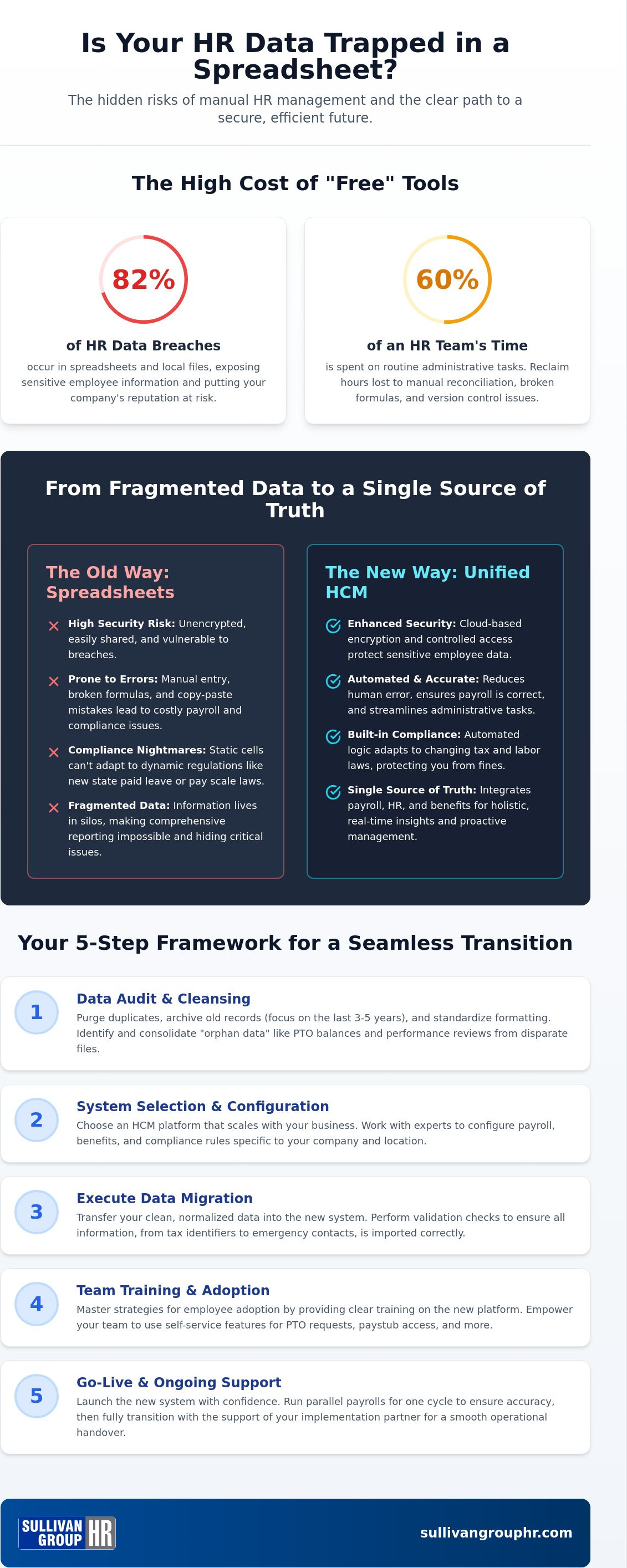
Is your business legacy currently resting on the fragile cells of an Excel workbook that's one accidental "delete" away from a compliance disaster? If you're still managing your team's life cycle through manual tabs, migrating from spreadsheets to HR software isn't just a technical upgrade; it's a necessary shield for your organization's future. It's understandable why you've held on. Spreadsheets are familiar, but they're also where 82% of HR data breaches occur. Between version control nightmares and the constant fear of a manual entry error causing a payroll mistake, the "free" tool is starting to cost you far too much in time and peace of mind.
We know you value the people behind the data, and you deserve a system that reflects that commitment. This guide shows you how to transition your records to a unified HCM platform without losing history or disrupting operations. We'll walk through the specific 2026 regulatory shifts, like Minnesota's new paid leave or California's pay scale updates, that make manual tracking nearly impossible. You'll discover how to cleanse your data and move toward a future where you spend 60% less time on paperwork and more time on your team's potential.
Key Takeaways
- Identify the exact moment manual tracking becomes a liability and how to reclaim hours lost to tedious reconciliation.
- Learn the essential steps for a data audit that purges errors and standardizes formatting before you make the move.
- Execute a seamless transition using our 5-step framework for migrating from spreadsheets to HR software without disrupting your daily operations.
- Overcome implementation anxiety by mastering strategies for employee adoption and managing historical data gaps.
- Explore the Sullivan Group advantage and see how the isolved HCM platform provides the security and scalability your business needs for 2026.
The Hidden Risks of Spreadsheet-Based HR in 2026
Have you reached the spreadsheet plateau? It's that specific moment when your "simple" workbook starts feeling like a house of cards. For most growing firms, migrating from spreadsheets to HR software becomes a necessity once you hit 10 to 25 employees. At this size, manual tracking isn't just slow; it's a liability. Every manual reconciliation consumes hours that you should be spending on growth, culture, and strategy. You need a system that grows with you, not one that holds you back.
Consider the hidden costs of "free" tools. While Excel doesn't come with a per-user fee, it carries a heavy tax on your time. Research shows that HR teams often spend 60% of their day on routine administrative tasks. When formulas break or version control fails, the true cost is measured in payroll errors and employee frustration. Your business deserves better than a system held together by copy-and-paste commands. It's time to trade manual labor for meaningful leadership.
Security is another growing concern that cannot be ignored. HR data is present in 82% of analyzed breach incidents. Local files lack the encryption and access controls of a modern, cloud-based platform. Protecting your legacy means moving sensitive data away from vulnerable desktops and into a secure environment, and you can explore Managed IT Services to ensure your entire technical infrastructure remains resilient. This transition safeguards your employee's private information and your company's reputation simultaneously.
The Compliance Gap: Beyond Simple Calculations
The regulatory environment in 2026 moves too fast for static cells. New laws in states like Oregon require detailed pay breakdowns, while Minnesota has launched mandatory paid leave programs. Static spreadsheets simply cannot handle these dynamic logic changes. A single broken formula during a Department of Labor audit can lead to significant fines and legal headaches. Understanding what is human capital management helps you see the difference between a list of names and a comprehensive system of protection. Automated logic ensures your taxes and benefits are always accurate, regardless of how laws change.
Fragmented Data vs. Unified HCM
Separating your payroll records from your employee files creates an invisible risk. When data lives in silos, errors go unnoticed until they become expensive. Modern workforce management relies on a "Single Source of Truth" where every piece of information connects seamlessly. By integrating these functions into a Human Resource Management System (HRMS), you eliminate the need for double entry and reduce the chance of human error. This shift moves your team from reactive data entry to proactive HR risk management, ensuring your business stays compliant and your employees stay protected.
Preparing Your Data for a Seamless Transition
Preparing for a move is never just about packing boxes. It's about deciding what's worth keeping in your new home. When migrating from spreadsheets to HR software, your data is the most valuable asset you own. But is it ready for the transition? A successful migration starts with a ruthless audit. You need to distinguish between critical records and digital clutter. Purge the duplicates. Archive the outdated. Keep the essentials. This isn't just about cleaning up; it's about building a foundation for your future HCM that actually works for you.
How much history do you actually need? While it's tempting to migrate every spreadsheet from the last decade, focus on the last three to five years of records. This timeframe typically satisfies most 2026 regulatory audits while keeping your new system lean and efficient. Don't forget about "orphan data." These are the PTO balances, performance reviews, and emergency contacts hidden in disparate tabs or local folders. Identifying these gaps now prevents a frantic search during your first payroll run. A successful strategy for migrating from spreadsheets to HR software relies on following data migration best practices to ensure that no critical piece of employee history is left behind.
Data Normalization for HR Managers
Consistency is the language of software. In a spreadsheet, "St." and "Street" are the same to a human eye. To a database, they're different. You must standardize naming conventions and verify tax identifiers before the first upload. This step is especially critical for your benefits management solutions. If your data is messy, your enrollment will be too. Taking the time to validate Social Security numbers and address formats now saves you from a compliance nightmare later. If this feels like a heavy lift, partnering with an HR expert can help you organize your records with professional precision.
Mapping Your New HR Ecosystem
How does a candidate become a contributor? Visualizing the journey from applicant tracking and onboarding into your core HR records is essential. You aren't just moving data; you're designing a workflow. Establish who sees what by defining record-level security and user permissions early. This ensures that sensitive salary info stays private while managers get the reports they need. Finally, connect the dots between time-tracking and payroll. When these systems talk to each other, you eliminate the manual entry that leads to mistakes and frustration.
The 5-Step Framework for Software Implementation
How do you move from a manual process to a high-performance system without losing sleep? Migrating from spreadsheets to HR software requires a structured approach that protects your payroll integrity. It's about moving with purpose, not just speed. You aren't just changing tools; you're upgrading your business's central nervous system. This transition represents a shift from reactive data entry to strategic human capital management.
Step 1 is Selection and Alignment. Don't just buy the first software you see. Choose a platform that scales. It should handle your team of twenty today and your team of two hundred tomorrow. Step 2 is The Clean Sweep. This is your final scrub. You've already performed a data audit, but this is the moment to validate every tax ID and home address against your source documents. Precision now prevents frustration later.
Step 3 involves The Pilot Upload. Move a small, diverse group of records first. If there's a mapping error, it's better to fix five records than five hundred. Step 4 is The Parallel Run, which is your ultimate safety net. Finally, Step 5 is The Full Cutover. This is the official "go-live" where you decommission the old files for good and embrace your new unified platform.
Execution Strategy: The Parallel Run
The parallel run is the most critical safety feature of your migration. It involves processing your payroll in the new software while simultaneously maintaining your legacy spreadsheets for one full cycle. Why do this? It allows you to catch "rounding differences" in tax calculations or benefit deductions that could cause headaches later. If you work with payroll administration outsourcing partners, this is the time to ensure everyone's systems are perfectly synced. Comparing these outputs side-by-side ensures your first "real" digital payroll is flawless and compliant.
The Full Cutover Checklist
Once your parallel run proves successful, it's time to pull the trigger. But before you do, follow this final checklist to ensure a smooth transition:
- Verify YTD Balances: Ensure year-to-date totals for earnings, taxes, and deductions in the new system match your previous records exactly.
- Set a Hard Freeze: Establish a specific date and time when the old spreadsheets become "read-only." No more edits allowed in the old format.
- Help-Desk Protocol: Have a clear plan for the first 48 hours. Who do employees call if they can't log in? Who handles data corrections?
Migrating from spreadsheets to HR software is a journey toward professional maturity. By following these steps, you ensure the destination is a more secure, efficient, and professional workplace for your entire team.
Overcoming Common Migration Obstacles
Have you considered how your team feels about the shift? Transitioning your business is rarely just about moving files; it's about moving people. When migrating from spreadsheets to HR software, the biggest hurdle isn't usually the code. It's the culture. Change can be daunting. Your team might worry about learning a new system or losing the "way we've always done it." Addressing these fears early is the key to a successful rollout and long-term stability.
What happens when you find data gaps? It's common to discover missing historical records during a migration. Don't let a few empty cells stop your progress. Focus on the most critical information needed for 2026 compliance and current operations. You can build out historical archives over time, but your current workforce management solutions must remain functional from day one. This keeps your business moving forward while you close the gaps in the background.
Managing the learning curve requires a tiered approach. Not everyone in your office has the same tech-literacy level. Some will dive right in, while others need a guided hand. Use short training sessions, clear how-to guides, and peer champions to bridge the gap. By acknowledging these differences, you turn a potential obstacle into an opportunity for team growth and professional development.
Winning Employee Buy-In
How do you make the new system feel like a win for everyone? Highlight the benefits of employee self-service portals. No more waiting for a manager to check PTO balances or update a home address. This efficiency starts even before they're hired by streamlining the applicant tracking and onboarding process. Software empowers employees to manage their own career data, giving them direct control over their personal records and professional growth. When employees see that the system saves them time and increases their autonomy, resistance quickly fades.
Technical Troubleshooting and Support
Expect a few bumps in the road. It's important to differentiate between software bugs and simple data entry errors. Most system failures during migration are actually just mismatched formatting from the old spreadsheets. This is where a dedicated implementation partner becomes invaluable. You need a no-nonsense authority to keep the timeline on track and resolve conflicts quickly. A regional expert understands your specific territory and won't let technical glitches derail your business legacy. If you want to ensure your transition is handled with professional rigor, talk to Sullivan Group HR about your migration strategy today.
The Sullivan Group HR Advantage: isolved and Expert Guidance
Are you ready to stop being a data entry clerk and start being a business leader? Migrating from spreadsheets to HR software is a major milestone for any growing firm, but you don't have to walk that path alone. While national software vendors might offer you a login and a set of tutorial videos, we offer a partnership. We understand that your business isn't just a collection of cells; it's a legacy built on hard work and local commitment. Our team takes the heavy lifting off your shoulders, ensuring your transition is handled with professional rigor and empathetic support.
A partner-led migration means we don't just hand you a tool; we build you a foundation. We manage the technical burden of data validation and workflow mapping. This integrated approach connects your payroll administration, employee benefits management, and workers' compensation insurance into one seamless move. You gain long-term organizational security by moving from a transactional vendor relationship to a strategic alliance. Sullivan Group HR acts as your coach and ally, ensuring your administrative tasks feel manageable, organized, and secure.
By choosing a regional expert, you're opting for a "no-nonsense" authority that understands the specific nuances of your territory. We move beyond the sterile, bureaucratic feel of standard tech support. Our goal is to protect your business from the risks of manual tracking while unlocking your professional potential. This transition represents the final step in moving from reactive administration to proactive human capital management.
The isolved Difference
Why is isolved the industry-leading HCM platform for 2026? It's built on a unified platform architecture that eliminates the need for siloed spreadsheets. No more jumping between a payroll sheet, a benefits doc, and a workers' comp file. Everything lives in one place. This setup provides growth-minded firms with several key advantages:
- Unified Data: One single source of truth for every employee record.
- Advanced Insights: Use reporting to make real-time decisions about labor costs and talent.
- True Scalability: A system that grows with your headcount and complexity without breaking.
A Partnership Built on Legacy
Our history as an established regional expert means we provide more than just a software implementation. You gain ongoing access to professional human resources consulting that continues long after the migration is complete. We understand the local landscape and the specific regulatory pressures you face. This personalized touch acts as a localized "handshake," indicating that your success is the primary metric of our own. We value people over systems, and we're here to ensure your team has the support they need to thrive.
Ready to leave the spreadsheets behind? Contact Sullivan Group HR for a strategic HCM consultation.
Securing Your Business Legacy for 2026
Is your business ready to trade manual entries for strategic growth? Moving away from fragmented workbooks is about more than just efficiency. It's about protecting your people, your data, and your legacy. By cleaning your records, following a structured framework, and leaning on a regional expert, you ensure that your transition is a success. Migrating from spreadsheets to HR software represents a pivotal moment in your professional journey. It shifts your focus from correcting formulas to coaching your team.
As an official isolved HCM platform provider with decades of HR outsourcing expertise, Sullivan Group HR offers the stability you need. We provide comprehensive support that spans from the initial implementation to long-term consulting. You don't have to navigate the complexities of 2026 regulations alone. Upgrade your HR strategy and migrate to the isolved platform today. Your team is your greatest asset. Give them the security and professionalism they deserve. We're ready to help you build a stronger, more secure future.
Frequently Asked Questions
Is it better to migrate HR data at the beginning of the year?
Starting on January 1st is often ideal because it provides a clean break for tax records and year-to-date balances. This timing simplifies the reconciliation process and ensures your historical reporting aligns perfectly with the calendar year. However, don't wait if your current manual system is failing. A mid-year transition is perfectly manageable as long as you perform a thorough parallel run to verify that your data remains accurate across both systems.
How long does the average migration from spreadsheets to HR software take?
Most small to mid-sized businesses complete the transition within 30 to 90 days. This timeline depends heavily on the cleanliness of your existing records and the complexity of your current workflows. While the technical upload happens quickly, the preparation and validation phases require deliberate care. Migrating from spreadsheets to HR software is a journey that rewards patience. Taking the extra time to audit your data upfront prevents technical headaches once you go live.
What is the most common mistake companies make when moving away from Excel?
The biggest error is importing "dirty data" without performing a comprehensive audit first. If your spreadsheets contain inconsistent naming conventions or missing tax identifiers, those errors will follow you into the new system. You shouldn't just move your mess to a new home. A successful migration requires a clean sweep of your historical records. Standardizing your data before the first upload ensures your new platform functions with the professional rigor your business legacy deserves.
Can I migrate my historical payroll data into a new HCM platform?
Yes, you can and should migrate your historical payroll records to maintain a complete employee story. We typically recommend moving three to five years of data to satisfy most regulatory requirements and internal reporting needs. This history provides the context needed for advanced reporting and AI-driven insights. By keeping this information in a unified platform, you eliminate the need to go back and search through old, vulnerable spreadsheets during a future audit.
Will HR software help with 2026 labor law compliance?
Modern HCM platforms are specifically designed to handle the dynamic regulatory shifts occurring in 2026. For example, systems like isolved automatically update to reflect new state-mandated paid leave programs or revised pay scale disclosure rules. Static spreadsheets simply cannot keep up with these changes without manual formula updates that are prone to human error. Automation provides a protective shield, ensuring your business stays compliant with the latest federal and state requirements without extra effort.
How do I ensure my employees actually use the new HR system?
Adoption depends on clearly communicating the personal benefits to your team, such as mobile access and self-service portals. When employees realize they can update their own addresses or check PTO balances without waiting for an email response, buy-in happens naturally. We recommend using a phased rollout and peer champions to help bridge the learning curve. When you position the software as a tool for their empowerment, it becomes a welcome part of their daily work life.
Do I need a consultant to help with HR data migration?
While software vendors provide tools, a consultant offers the empathetic partnership and regional expertise needed for a truly seamless move. An expert partner handles the technical heavy lifting and risk management that national firms often overlook. This collaborative approach ensures your business nuances aren't lost in the shuffle. Having a "no-nonsense" authority by your side provides a sense of security and ensures your timeline stays on track while you focus on leading your people.
What happens if there is a discrepancy between my spreadsheet and the new software?
Discrepancies are usually the result of rounding differences or manual errors that existed in your legacy spreadsheets for years. The parallel run phase is specifically designed to uncover these hidden mistakes before they impact your actual payroll. When we find a mismatch, we investigate the root cause and validate it against official tax and benefit documents. This process acts as a final filter, ensuring your digital records are more accurate than your manual ones ever were.


