
What good is a record of every hour worked if someone still has to chase, check, and re-enter it before payroll? A time and labor management system should do more than collect time entries. It should help employers organize work-time information and connect it with the payroll and HR processes that follow.
If manual time records are difficult to coordinate with payroll, start by mapping how information moves today. Choosing a system can feel complicated when it is unclear which capabilities fit your actual process. This guide explains what a time and labor management system can do, what to compare, and how to prepare employees, managers, and administrators for a new workflow.
Technology works best when people know how to use it and where to turn for support. Sullivan Group HR provides time tracking through isolved HCM technology as part of broader workforce management services, with a dedicated specialist assigned to each client. The offering also brings together payroll processing, tax filing, and benefits administration, alongside 40 years of experience in payroll, HR, and employee-benefits management.
Key Takeaways
- A time and labor management system can organize time records and support related workforce processes, but capabilities vary by platform.
- Map how time is recorded, reviewed, corrected, and prepared for payroll to identify gaps and handoffs.
- Compare manual processes, separate tools, and integrated HCM based on workflow, reporting needs, and support.
- Prepare for adoption by defining requirements, organizing records, communicating changes, and assigning clear ownership.
- Sullivan Group HR combines isolved HCM technology with a dedicated specialist and connected payroll and benefits services.
What Is a Time and Labor Management System, and What Does It Manage?
A time and labor management system is software that helps employers record and organize work-time information. Depending on its capabilities, it may also connect time data with other workforce administration tasks. Time records document work, while labor planning concerns how work and workforce time are arranged. The terms are related, but they do not mean the same thing.
Plain-language definition: A time and labor management system supports the recording and administration of employee work time and may support additional labor processes. Because product functions differ, assess specific capabilities rather than relying on the system’s name.
Organized time information gives managers and administrators a clearer basis for reviewing hours and preparing payroll. If records are incomplete or spread across disconnected processes, someone may need to reconcile them before they can be used. Define who checks entries, resolves missing information, and approves corrections. Software can support that workflow, but it does not remove the need for appropriate review.
Time tracking, time and attendance, and labor management: what differs?
Time tracking records the time an employee works. Time and attendance focuses on presence and attendance events, such as when someone arrives or is absent. Labor management is broader and can refer to planning and administering workforce time and work. These functions may overlap, but vendors do not always use the terms in the same way. The overview of time and attendance systems offers background on the core function. Compare product tasks and workflows to see what a platform actually covers.
Who can benefit from a time and labor management system?
Employers with hourly work, varied schedules, or growing administrative coordination may benefit from a more consistent way to manage time information. The key question is whether current processes make it straightforward to record, review, correct, and share hours with the people who prepare payroll.
Start with the work itself. If managers collect hours in different formats, schedules change frequently, or administrators spend time chasing missing details, a clearly defined process may help. For service-based businesses managing mobile staff, field operations platforms like Team-Trak offer streamlined tools to record on-site attendance accurately. A system can provide structure, but it still needs clear responsibilities and procedures that fit the organization. Focus on reliable information and a manageable workflow, rather than assuming software will automatically reduce costs or increase productivity.
How Does a Time and Labor Management System Connect Workforce Processes?
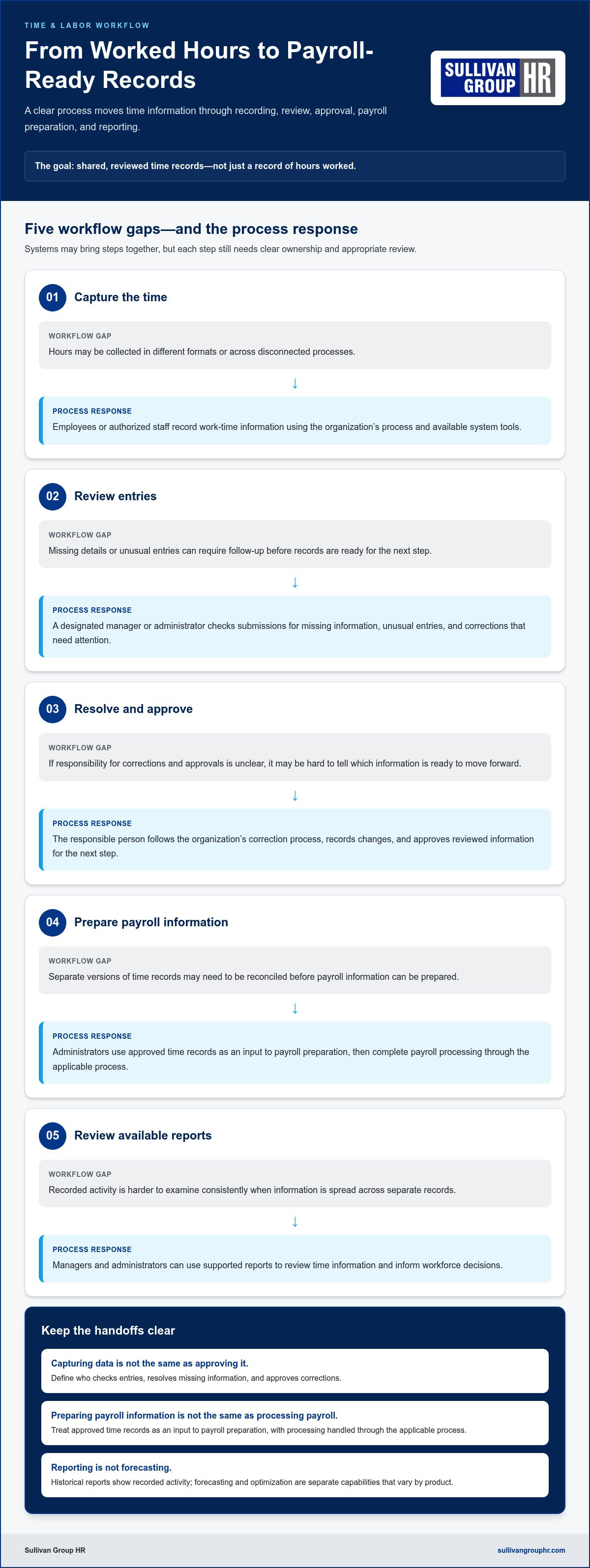
A practical workflow moves time information through several steps: employees record it, designated people review it, administrators prepare it for payroll, and managers use available reports to understand recorded activity. A time and labor management system may bring some of these steps together, but the process still depends on clear ownership and suitable review. Capturing data is not the same as approving it, and preparing payroll information is not the same as processing payroll.
- Record time. Employees or authorized staff enter work-time information using the organization’s process and the tools available in the system.
- Review entries. A designated manager or administrator checks submissions for missing details, unusual entries, and corrections that need attention.
- Resolve and approve. The responsible person follows the organization’s correction process, records changes, and approves reviewed information for the next step.
- Prepare payroll information. Administrators use approved time records as an input to payroll preparation, then complete payroll processing through the applicable process.
- Review available reports. Managers and administrators use supported reports to examine time information and inform workforce decisions.
Connected time records give payroll administrators a consistent, reviewed basis for preparing payroll information. They do not replace sound review practices, but they can help everyone work from shared records instead of reconciling separate versions.
From employee time records to payroll administration
Set review responsibilities before time information moves toward payroll. Decide who checks submissions, who can approve them, and how employees or managers flag corrections. Document how changes are handled so it is clear which entries are original and which have been reviewed. Employers can also consult U.S. Department of Labor compliance assistance for information relevant to workplace requirements and recordkeeping responsibilities.
Reporting, visibility, and workforce decisions
Where a system supports reporting, employers may be able to review recorded hours or other time information in a consistent format. Historical reports show recorded activity over a period; they do not, by themselves, predict future staffing needs. Forecasting and optimization are separate capabilities that vary by product, so do not assume they are part of basic time tracking.
Shared records can give managers and administrators a common reference when discussing coverage, hours, or corrections. Reports are only as useful as the information and process behind them. Decide who needs access and what decisions each report should support. For a wider view of how workforce technology and people practices fit together, see the workforce management solutions guide.
If you want to connect time tracking with payroll administration and personal guidance, Sullivan Group HR’s workforce support combines isolved HCM technology with a dedicated specialist.
How Should You Compare Time and Labor Management Approaches?
Choosing a time and labor management system is less about finding the longest feature list and more about matching the setup to how your organization works. Manual records, separate tools, and an integrated HCM approach each have trade-offs. Compare how information moves between employees, managers, and payroll administrators, along with the support people need at each step.
| Approach | Workflow continuity | Reporting needs | Administrative handoffs | Human support |
|---|---|---|---|---|
| Manual records | Processes rely on established forms and routines. | Information may need to be gathered and organized for review. | People pass records between employees, managers, and administrators. | Support comes through the employer’s own procedures and staff. |
| Separate tools | Distinct tools handle different tasks, so handoffs need coordination. | Reports may draw on separate sources, depending on the setup. | Someone needs to manage how information moves between tools. | Support may come from internal staff and separate tool providers. |
| Integrated HCM approach | Connected processes can bring related workforce information together. | Reporting depends on the platform’s available functions. | Some handoffs may be connected, but not every task is automated. | Support depends on the service model, not software alone. |
This comparison describes common considerations, not guaranteed outcomes. Separate tools can work well when responsibilities and information transfers are clearly managed. An integrated platform can connect processes, but it does not determine who approves time, how corrections are handled, or how managers apply workplace policies.
Manual processes versus separate tools versus an integrated platform
Look beyond the technology. Clear policies and consistent manager practices matter in every setup. Software can provide a place to record and review information, but it cannot replace sound decisions or an agreed process for resolving discrepancies. Compliance support can help employers understand responsibilities, but it does not guarantee compliance. Employers remain responsible for applying requirements to their own circumstances. For organizations in specialized sectors like horticulture, industry initiatives such as fairfarms.com.au provide dedicated HR support and guidance to help employers navigate complex workforce and labor standards.
A practical checklist for evaluating system fit
Before comparing options, write down the work the system needs to support. Specify which records employees submit, which payroll tasks use those records, and what information managers need. Then consider whether employees and managers can follow the process consistently, who owns approvals and corrections, and what ongoing support administrators will need.
- Identify the time records and review steps your process requires.
- Map how approved information reaches payroll administration.
- Define the reports that inform your decisions, distinguishing historical review from any forecasting needs.
- Assign responsibility for entry, review, corrections, and handoffs.
- Set expectations for employee and manager usability, training, and support.
Payroll is a key part of this assessment. Consider how time information fits into the wider payroll process, including the roles of administrators and service partners. The payroll administration outsourcing guide offers more context for that connection.
Sullivan Group HR combines time tracking through isolved HCM technology with payroll services and a dedicated specialist. Explore Sullivan Group HR’s time and attendance support to learn how technology and guidance can work together.
How Can Employers Prepare to Adopt a Time and Labor Management System?
A smooth transition starts before anyone logs in. A time and labor management system can support a clearer process, but employers still need to decide how time information should be handled and who is responsible at each stage. Map the work, prepare people for the change, and review how the process functions once it is in use.
Map the current timekeeping and payroll workflow
Write down how employees record work time, who reviews it, how corrections are made, and how approved information reaches payroll. Follow a sample record through each handoff. Where does it wait? Who can resolve a question? This workflow map can reveal missing steps, duplicated effort, or responsibilities that need to be assigned before a new process begins.
Use what you learn to define requirements before comparing software or discussing implementation plans. Be specific about the records you need, the review and correction process, the payroll handoff, and the information managers need. Identify the internal policies and practices the system must support, too. A tool can organize a workflow, but it cannot decide what your organization’s process should be.
Prepare employees and managers for a new process
People need to know what is changing and what is staying the same. Explain how employees should submit time, how managers will review it, and where to direct questions or corrections. Give managers practical guidance for applying the agreed process consistently. Clear instructions reduce guesswork and help employees understand their role in keeping records complete.
Use this sequence to organize preparation:
- Map the process. Record the current steps from time entry through payroll handoff, including who handles exceptions.
- Set requirements. Identify essential records, approvals, reports, and responsibilities before evaluating system options.
- Prepare records and procedures. Review existing information for gaps or inconsistencies, and document how the new process handles entries and corrections.
- Communicate the change. Share clear instructions with employees and managers, including where they can get guidance.
- Review and refine. Gather feedback, look for recurring questions or errors, and adjust instructions or internal procedures when needed.
Keep ownership visible. Employees should understand how to submit time; managers should know what they review and approve; administrators should know how to handle corrections and prepare information for payroll. If a step has no clear owner, assign one before the process goes live.
Adoption continues after a system is introduced. Pay attention to repeated questions, missed steps, and records that need clarification. Those signals can show whether instructions are working or procedures need adjustment. Sullivan Group HR combines isolved HCM technology with a dedicated specialist to support connected workforce administration. Explore Sullivan Group HR’s time tracking support.
How Sullivan Group HR Combines Time Tracking with Workforce Support
A time and labor management system is most useful when its technology fits into the wider work of administering a workforce. Sullivan Group HR provides time tracking through isolved HCM technology alongside payroll and HR services, with a dedicated specialist assigned to each client. Employers have both a platform and a person to work with as they coordinate workforce administration.
The offering includes payroll processing, tax filing, time tracking, and benefits administration. Sullivan Group HR also provides compliance support covering Federal, State, and Local employment regulations, along with workers’ compensation assistance. These services bring time information together with related administrative responsibilities, while the workflow itself depends on an employer’s processes and needs.
Technology backed by a dedicated specialist
Sullivan Group HR is a proud isolved Network Partner, using isolved HCM technology described as enterprise-grade. Each client is assigned a dedicated Sullivan Group HR specialist. Technology supports workforce administration, while the specialist provides a human point of contact as employers work through their processes. The approach combines a platform with personal service without treating software as a substitute for people or promising a particular result.
Sullivan Group HR brings 40 years of experience in payroll, HR, and employee-benefits management. That experience is relevant to the connections employers manage across time records, payroll, benefits, and compliance. Rather than considering time tracking in isolation, employers can look at how it fits with broader administration and where they need guidance.
A connected approach to payroll, time, and HR
Time tracking provides work-time information for the wider payroll process. Sullivan Group HR brings time tracking together with payroll processing and tax filing, as well as benefits administration. Compliance support and workers’ compensation assistance cover additional areas of workforce administration. Consider these responsibilities as connected parts of managing a workforce, while keeping ownership of each process clear.
When evaluating support, consider how time tracking fits your existing payroll and HR practices, which administrative tasks you want to coordinate, and where a dedicated specialist could help. Sullivan Group HR combines isolved HCM technology with workforce services and a dedicated client relationship.
For technology alongside personal guidance, explore Sullivan Group HR’s workforce management support.
Make Your Next Workforce Process More Connected
Your next step does not have to be a major system change. Start by identifying one point in your timekeeping process that needs clearer ownership, smoother handoffs, or better support. Use that priority to define what a time and labor management system should help your team do and how it should fit your organization’s workflow.
Look beyond the software itself. A workable approach depends on people understanding their roles, administrators having support, and workforce information moving through a process everyone can follow. The right partnership can help you make those connections thoughtfully, while keeping the people behind each record and decision in view.
Sullivan Group HR brings isolved HCM technology and personal service together to support workforce administration. Explore how Sullivan Group HR can support your workforce management.
Clearer processes can start with one practical conversation. Take that next step with confidence.
Frequently Asked Questions
What is a time and labor management system?
A time and labor management system is a tool employers use to organize work-time information and related workforce processes. For example, a business might use one to collect employee time entries and make them available for administrative review. The platform’s scope depends on its capabilities, so define the tasks you need it to support before deciding whether it fits your workplace.
Is time and labor management the same as time and attendance?
No. Time and attendance generally refers to recording when employees work or are present, while time and labor management can cover a wider set of workforce time processes. A system focused on attendance records may not support the broader processes your organization needs. Compare each tool’s functions and workflow rather than relying on category labels.
Can a time and labor management system connect to payroll?
Some systems can connect time information with payroll processes, but the specific workflow depends on the platform and setup. An employer may, for example, have a manager review submitted hours before administrators use them in payroll preparation. Define who handles missing entries, corrections, and approvals. A system can support the connection, but employers still need clear review practices.
Does time and labor management software guarantee compliance?
No. Software can support record organization and workforce administration, but it cannot guarantee that an employer meets every applicable requirement. A tool may help keep time information organized, while the employer remains responsible for setting policies and applying relevant rules to its circumstances. Compliance support can help employers understand Federal, State, and Local employment regulations, but it does not guarantee a particular result.
How do you choose a time and labor management system?
Start with your organization’s workflow, then assess each time and labor management system against it. Note the records you use, who reviews them, what payroll preparation requires, and which reports managers need. Consider whether employees and managers can follow the process and how administrators will get support. A concise list of required tasks makes system demonstrations more focused and easier to compare.
What does Sullivan Group HR offer for time and labor management?
Sullivan Group HR provides time tracking through isolved HCM technology as part of its workforce management services. The offering includes payroll processing, tax filing, benefits administration, compliance support, and workers’ compensation assistance. Each client has a dedicated Sullivan Group HR specialist. The company brings 40 years of experience in payroll, HR, and employee-benefits management to its work with employers.


